QNAP ES1686Adc Puts Dual-Port U.3 NVMe in Every Bay of a 3U SAS Array
QNAP's ES1686Adc lets each of 16 bays take SAS or dual-port U.3 NVMe in an active-active ZFS chassis. Confirm bay link speeds before you plan an NVMe tier.
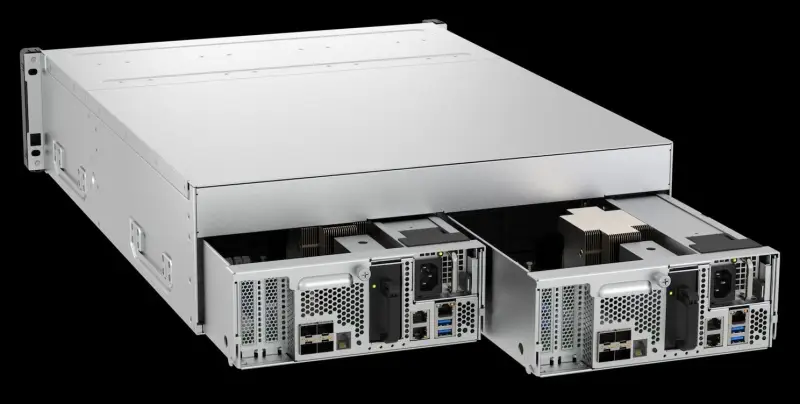
The interesting part of QNAP's ES1686Adc isn't the 3U chassis or the dual controllers. It's that every one of the 16 bays accepts either SAS or dual-port U.3 NVMe. That lets you fill the box with high-capacity SAS disks today and convert bays to flash later without buying a second platform. For anyone who has outgrown a SAS-only array but doesn't want to pay for all-flash across the board, that's the pitch worth testing.
One Chassis, Two Drive Types
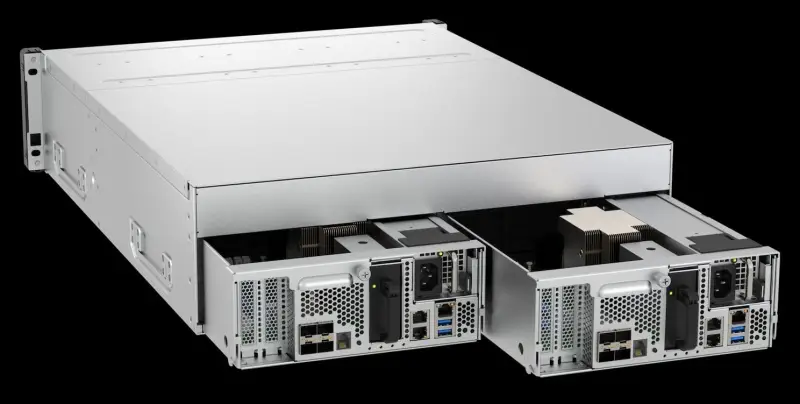
All 16 bays take 3.5-inch SAS HDDs, 2.5-inch SAS SSDs, or dual-port U.3 NVMe SSDs. QNAP positions this as the step up from the earlier ES1686dc, whose bays were SAS only. The NVMe support is the main change.
The layout has a practical consequence. QNAP says that filling the first four slots with U.3 NVMe or SAS SSDs creates a System Pool. QES, the operating system, reserves a small part of that pool for a hidden four-disk mirror, which keeps system operations off the hard drives. The rest of the SSD capacity in that pool can act as L2ARC read cache and ZIL write cache for the SAS HDD pools behind it. So the flash you add for performance also does double duty for the spinning disks, and you don't need a separate tier to get that benefit.
In practice, that means the first four bays are a decision you make early. If you dedicate them to SSDs for the system pool and cache, you're committing part of the chassis to flash before you know how much the HDD pools will need.
Active-Active Controllers and Failover
Each controller carries an eight-core Intel Xeon D-2142IT, 64GB of DDR4 ECC memory expandable to 512GB, four 10GbE SFP+ ports, three 2.5GbE ports with one assignable to remote management, and two PCIe Gen3 x8 slots. Both controllers process I/O at the same time and are linked by a PCIe non-transparent bridge.
QNAP says that if one controller fails, the surviving controller takes over its drives and network addresses with no interruption or reconnection for front-end applications. That claim matters most for VMware and Hyper-V clusters, where a reconnect storm after failover can cause more trouble than the failure itself. Test it in your own environment before you rely on it. Pull a controller in a lab with your real hosts and multipath configuration, and watch what your applications do.
The controller specification is the same one QNAP uses in its 24-bay all-flash ES2486AFdc. That's useful for planning because you can reason about CPU and memory headroom from a platform that's already been described in detail.
Reading the Benchmark Numbers Carefully
QNAP lists 579,502 4K random read IOPS and 257,701 4K random write IOPS over iSCSI. For SMB sequential throughput it lists 8,352MB/s read and 3,557MB/s write. Those numbers come from QNAP's own lab, with eight 10GbE ports in use, QES 2.2.1, and a RAID 5 group of 16 SAS SSDs, eight from Seagate and eight from Samsung.
Two things stand out. First, the test used SAS SSDs and no NVMe, so the headline figures don't describe the U.3 tier at all. Second, QNAP hasn't published results for U.3 drives or for hard drive pools with SSD cache. We haven't run or audited these tests, so treat them as the vendor's lab results rather than as a guarantee for your workload. If your sizing depends on the NVMe tier, you'll need your own numbers or a proof-of-concept unit.
Check the Bay Link Speed Before You Size an NVMe Tier
This is the detail I'd resolve first. QNAP's product page pitches the U.3 bays as a path to PCIe Gen4 performance. The hardware specifications, though, list both expansion slots as PCIe Gen3 x8 and give no link speed for the drive bays. On the ES2486AFdc, which uses the same processor, QNAP states a PCIe Gen4 x4 link for every bay. The ES1686Adc documentation doesn't say the same.
That gap changes the arithmetic. If you're buying the NVMe bays for throughput, the link speed decides how much of a fast SSD you can actually use. Before you size a flash tier, get written confirmation of the bay link speed from QNAP. Don't assume it carries over from the 24-bay model.
Where the Hybrid Pitch Fits
QNAP's product manager, Sean Teng, framed the design this way: "Not all data requires extremely expensive all-flash space." Teng said that mixing U.3 NVMe SSDs with high-capacity SAS drives lets a business balance performance and cost in one chassis while keeping services online.
That's a sound argument for many environments. Most file estates have a small hot set and a large cold set, and a hybrid array with SSD cache on the HDD pools is a familiar way to serve both. The catch is that the hot-tier performance depends on decisions you make at configuration time, including which bays become the system pool and how much SSD capacity goes to cache.
Data Protection, Power, and Expansion
QES is QNAP's FreeBSD and ZFS-based operating system for its dual-controller arrays. End-to-end checksums detect and repair silent data corruption, inline deduplication and compression reduce what lands on the SSDs, and QNAP describes snapshot capacity as nearly unlimited. Write cache sits in DRAM, and each controller pairs a battery backup unit with a 64GB M.2 SATA SSD. If power fails, the battery keeps the controller running long enough to copy cached writes to that drive.
For hosts, QES serves SMB and NFS file shares alongside iSCSI and Fibre Channel block storage, with VAAI and ODX offload for VMware and Hyper-V and iSER to reduce host CPU load. Each controller's two PCIe slots accept optional Fibre Channel cards up to 32Gb/s or 25GbE adapters. With optional SAS expansion cards and dual-path cabling, the array can connect to as many as seven QNAP SAS expansion units, which QNAP says brings capacity into the petabyte range.
Power draw is modest for the density. QNAP lists typical consumption at 588.33W with all bays populated, and the redundant, hot-swappable 700W supplies run on 90 to 264VAC. The chassis weighs 23.82kg net and 34.63kg gross, which is worth remembering when you plan rack handling. The system carries a five-year warranty, with one year on the battery backup unit.
What to Do Next
Pricing and availability haven't been announced, so there's nothing to budget against yet. If the hybrid model fits your environment, the sequence I'd follow is simple. Ask QNAP for the bay link speed in writing. Ask for U.3 and cache-enabled test data or arrange a trial unit. And map out which four bays you'd dedicate to the system pool before you order drives. The ES1686Adc is a credible option for teams that want one platform to grow from SAS capacity into NVMe, and the open questions are the ones you can answer before you commit money.


