COUNT, COUNTA and COUNTBLANK: Why Your Excel Totals Disagree
COUNT, COUNTA and COUNTBLANK each define "filled" differently. Know which one counts what, and you can audit a column before a bad total reaches a report.
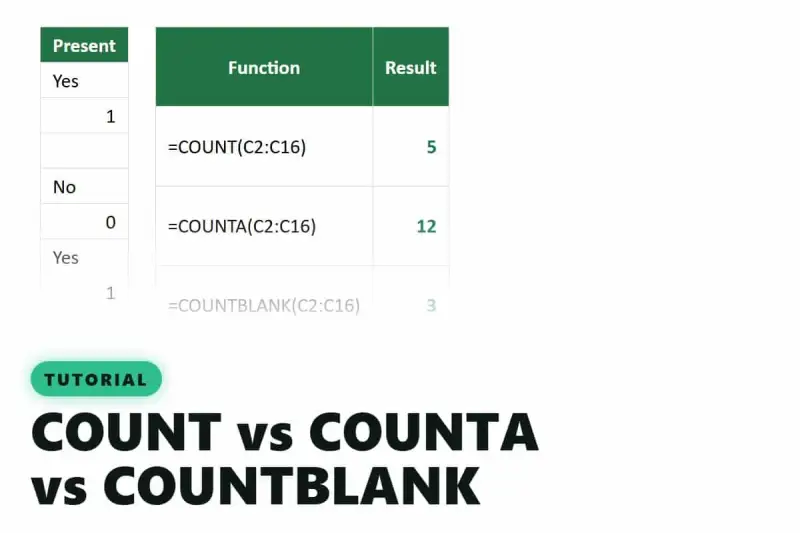
Three Excel functions count cells, and they rarely agree. COUNT, COUNTA and COUNTBLANK look interchangeable, but each one counts a different kind of content. Pick the wrong one and the total still looks plausible, which is why this mistake survives so long in shared workbooks.

A column that tells three different stories
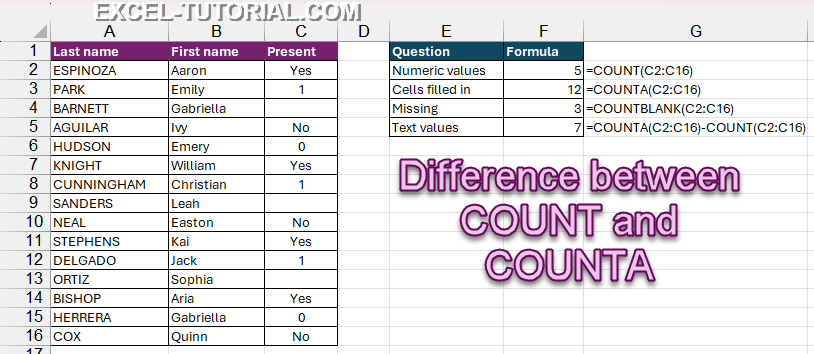
Picture an attendance list filled in by several people. Some typed Yes or No, others typed 1 or 0, and a few left the cell empty. Across 15 rows, the three functions give three different answers, and all three are correct for the definition they use.
COUNT only sees numbers
=COUNT(C2:C16)
COUNT counts cells holding a number: whole numbers, decimals and dates, since Excel stores dates as serial numbers. It skips text, empty cells, TRUE/FALSE values and errors.
On this list, COUNT returns 5, not 15. Only five entries were stored as numbers.

That makes COUNT the quickest sanity check for a column that should be numeric. If it returns fewer than the number of rows, some values are text. Any SUM built on that column will quietly undercount, and nothing in the workbook will flag it.
COUNTA counts anything that isn't truly empty
=COUNTA(C2:C16)
The A stands for All. COUNTA counts every cell with content: numbers, text, dates, TRUE/FALSE and even error values. Only a genuinely empty cell gets left out.
Here's the trap. A formula such as =IF(A2>10,"OK","") returns an empty text when its condition fails. The cell looks blank on screen, but it holds a formula, so COUNTA counts it. Anyone auditing by eye will miscount, and so will any total that trusts COUNTA alone.

COUNTBLANK counts what's missing
=COUNTBLANK(C2:C16)
COUNTBLANK does the reverse and counts the empty cells. It's the natural tool for checking a form, an import or a survey export: how many answers are still outstanding?
The definitions don't line up neatly, though. COUNTBLANK also counts a formula that returns an empty text, "", while COUNTA counts that same cell as filled. On a column full of such formulas, COUNTA plus COUNTBLANK can exceed the number of rows. Neither function is wrong. They just don't share a definition of "empty," and that's the thing to check before trusting either result.
Combine them to audit a column
Used together, the three functions become a diagnostic. Excel has no COUNTTEXT function, but subtraction gets you there: COUNTA counts everything, COUNT counts only numbers, so the difference is the number of text entries.
=COUNTA(C2:C16)-COUNT(C2:C16)
On the attendance list, the four results are:
- 5 numeric values (COUNT)
- 12 cells filled in (COUNTA)
- 3 people who never checked in (COUNTBLANK)
- 7 answers typed as text (COUNTA minus COUNT)
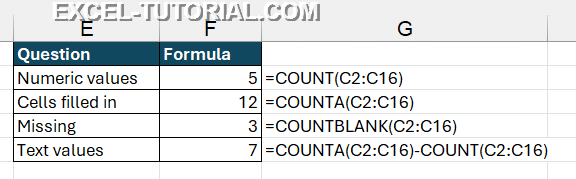
Those figures add up: 12 filled plus 3 blank makes the 15 rows. The column isn't broken. It was filled in two different ways, and now you can see how many of each. From there, ISTEXT can flag the text cells so you can convert or correct them, and IF can help build a cleaner column.
Add a condition when you need one
The moment you want to count only the "Yes" answers, the plain counting functions stop being enough. COUNTIF handles a single condition, and COUNTIFS handles several at once. Those are the tools for answering questions about meaning rather than about the cell type.
What to check before you trust a total
My read is that most bad totals come from one assumption: that a blank-looking cell is actually empty. Before you build a report on a shared list, run COUNT against COUNTA. If they disagree, look for text-formatted numbers and formulas returning "". Treat those as the first things to fix, because SUM and averages built on that column will be wrong until you do.


