Entra Conditional Access Quietly Adds Agent Session Risk Controls
An undocumented agentSessionRiskLevels property in Entra Conditional Access templates points to session-level risk checks for agent-assisted flows. Test it in report-only first.
AI agents are moving into everyday workflows. They read sensitive data, run code and execute tasks across organisational resources. A trusted agent can turn into a security problem quickly if its identity or activity is compromised or manipulated. Identity risk signals have traditionally focused on the user or the sign-in. Risk can also emerge while an agent is executing, and that's the gap this finding touches.
A parameter that isn't in the UI
While I was looking at the Microsoft Entra Conditional Access policy templates and their raw JSON, I found a property that doesn't appear in the admin center: agentSessionRiskLevels. Microsoft hasn't documented it, and it doesn't say which signals feed an agent session's risk level. Still, its presence suggests Entra is extending risk-based access controls from users and sign-ins down to individual agent sessions.
The template that caught my attention is Block Assistive Agent Flows with High Risk. Its policy summary reports one condition configured, but none of the visible condition pickers show a selection. The condition that's actually set only shows up in the exported JSON.
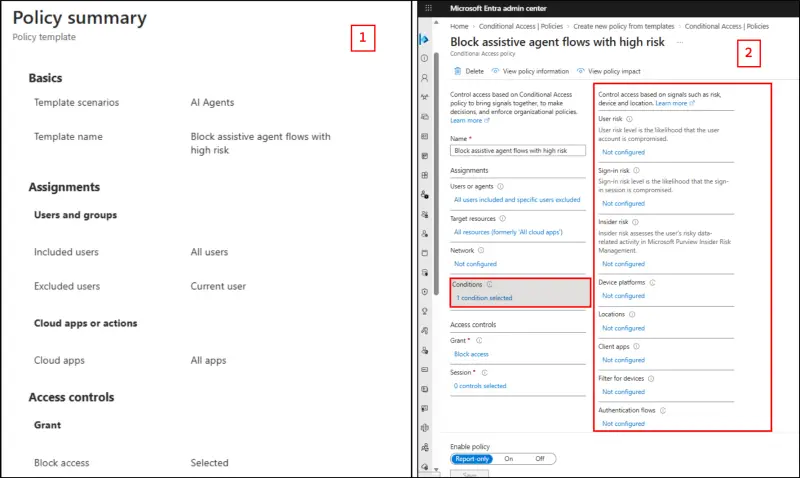
The exported configuration includes the following values in its conditions block:
"conditions": {
  "userRiskLevels": [],
  "signInRiskLevels": [],
  "clientAppTypes": ["all"],
  "agentSessionRiskLevels": "high",
  "agentContext": {
    "includeAgentContexts": ["allAgentAssistedFlows"],
    "excludeAgentContexts": []
  }
},
"grantControls": {
  "operator": "OR",
  "builtInControls": ["block"]
}
Two properties do the work here. agentSessionRiskLevels set to high defines the targeted session risk. agentContext defines scope, and this template includes all agent-assisted flows. The grant control is a block.
The scope matters. It isn't the same as policies aimed at autonomous agent identities or standalone agent user accounts. Those patterns need their own Conditional Access configuration, so don't assume one policy covers both.
Three points stand out to me:
- The schema is ahead of the UI. The exported policy carries agent session risk and agent context properties, but the granular controls aren't exposed in the admin center.
- Thresholds look flexible. The property appears to accept Low, Medium and High, so you could set a threshold that matches your own risk appetite.
- Scope is specific. The allAgentAssistedFlows value limits enforcement to agent-assisted executions rather than every AI agent authentication.
Why this matters: Conditional Access currently evaluates a user's sign-in as a whole. Session-level evaluation would let you block a risky agent-assisted request without cutting off the user's own access. That's the practical payoff. A user can keep working while the agent's risky action is stopped.
Building the policy in the admin center
Agent Session Risk isn't a selectable condition in the Conditional Access policy editor, so the options are the built-in template or a Microsoft Graph PowerShell configuration. For the template route:
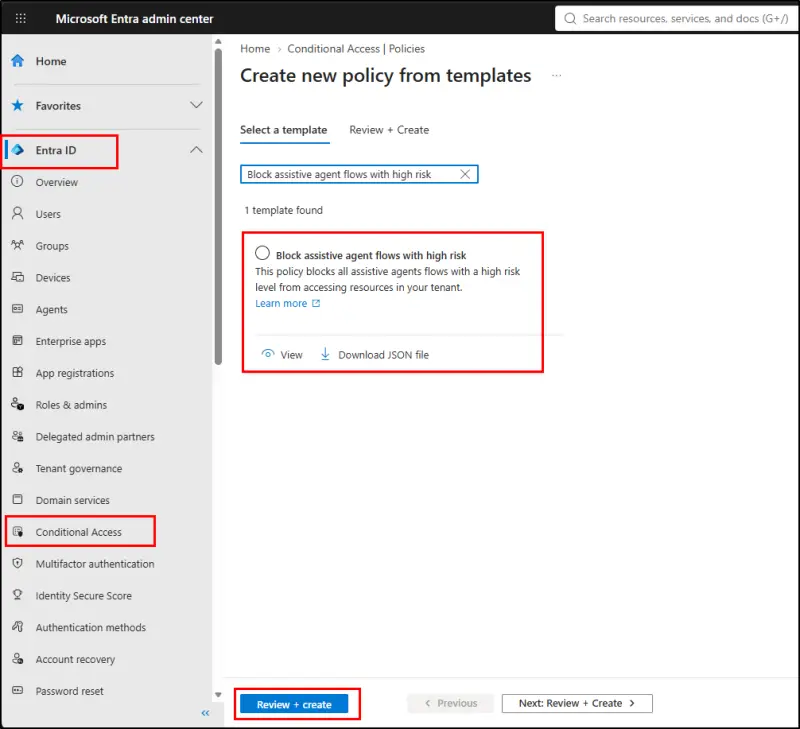
- Go to the Microsoft Entra admin center, then Entra ID, then Conditional Access, and select Create new policy from template.
- Search for and select Block assistive agent flows with high risk.
- Select Review + create and check the configuration.
- Set the policy to Report-only and create it. Once you've validated the results, switch it to On to block high-risk agent sessions.
After creating it, export the policy JSON and confirm that it includes agentSessionRiskLevels set to high and the allAgentAssistedFlows scope. That check is the only reliable way to see what the template actually configured.
Going beyond High with Graph PowerShell
The built-in template only targets high-risk sessions. If you want medium-risk sessions covered as well, you'll need Microsoft Graph PowerShell. Connect with the Policy.Read.All and Policy.ReadWrite.ConditionalAccess scopes first, then build the policy body. The snippet I tested sets agentSessionRiskLevels to medium, scopes agentContext to allAgentAssistedFlows, targets all users and all cloud apps, and applies a block grant. It sets the state to enabledForReportingButNotEnforced, then posts to the Graph beta endpoint.
That endpoint is beta, and the property is undocumented, so treat the script as a lab tool. Run it in a test tenant or in report-only mode in production, check the result in the policy JSON, and confirm the scope before you switch anything to On. A policy that targets all users and all apps is broad, and a mistake there affects a lot of sign-ins.
What the testing showed, and what it didn't
In my hands-on testing, the Agent Session Risk condition didn't trigger in the scenarios I ran, including sessions where malicious instructions were introduced. That doesn't mean the control is broken. It means I couldn't reproduce the signals that drive the risk level, and Microsoft hasn't published them. Until it does, you can't predict what will and won't be flagged. Treat the policy as an observation tool first.
Microsoft Entra already offers risk-based protection for agent identities and agent user accounts. Those measures may not cover the case where an agent acts on a user's behalf, which is where this property seems to point. Agent Session Risk Levels look like an attempt to close that gap by bringing session-level risk into Conditional Access decisions for agent-assisted flows.
My advice for the coming weeks: deploy the template in report-only mode in a test tenant, review sign-in logs for agent-assisted activity, and watch whether anything gets flagged at medium or high. If you see unexpected results, record the scenario and the exported JSON so you can compare them against any future documentation.


