Druva Agent Recovery Adds Single-Agent Restores for Copilot Studio
Druva Agent Recovery backs up Copilot Studio agents for single-agent restores, adds Power Apps and Power Automate coverage, and surfaces backup status in Azure SRE Agent.
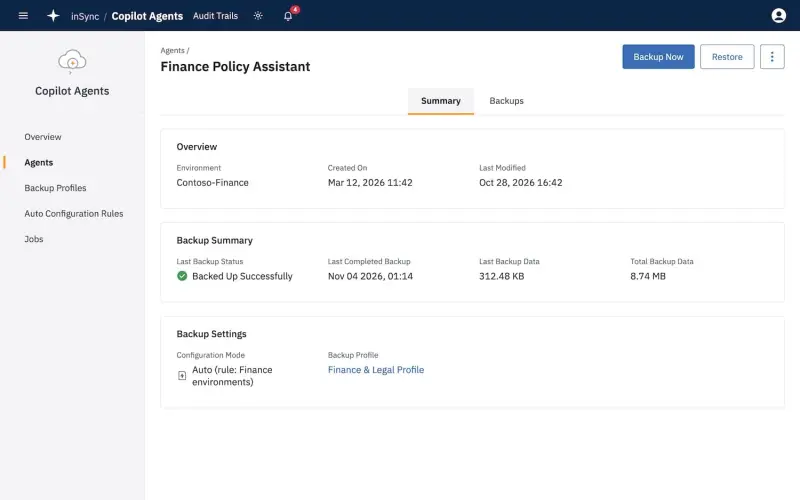
Druva's new Agent Recovery set is worth a look if you've started treating Copilot Studio agents as production assets. The product backs up custom agents and restores them when they're deleted or changed unexpectedly, and the first target is Microsoft Copilot Studio. The bigger shift is the restore granularity. Until now, recovering a broken agent usually meant rolling back an entire Power Platform environment or rebuilding the agent by hand. Druva is pitching single-agent recovery instead.
What Copilot Studio Agent Backup and Recovery Actually Does
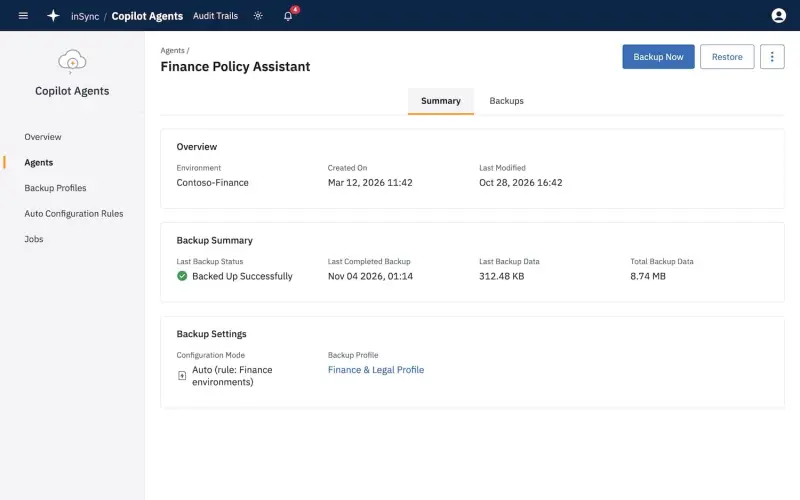
The first Agent Recovery product is Copilot Studio Agent Backup & Recovery. It protects customer-built agents and their configurations, and it discovers agents across Power Platform environments as employees create them. That discovery piece matters more than it might sound. Low-code agents tend to appear in environments without a ticket or a change record, so a backup process that depends on someone registering each agent by hand will miss things.
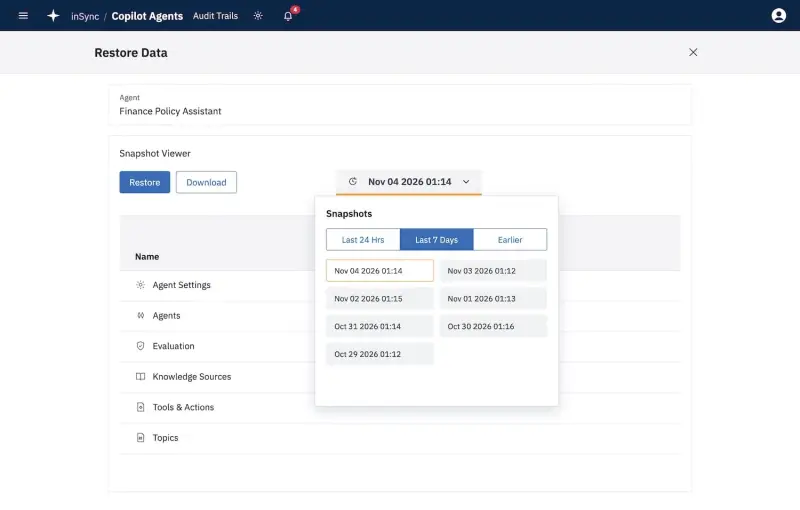
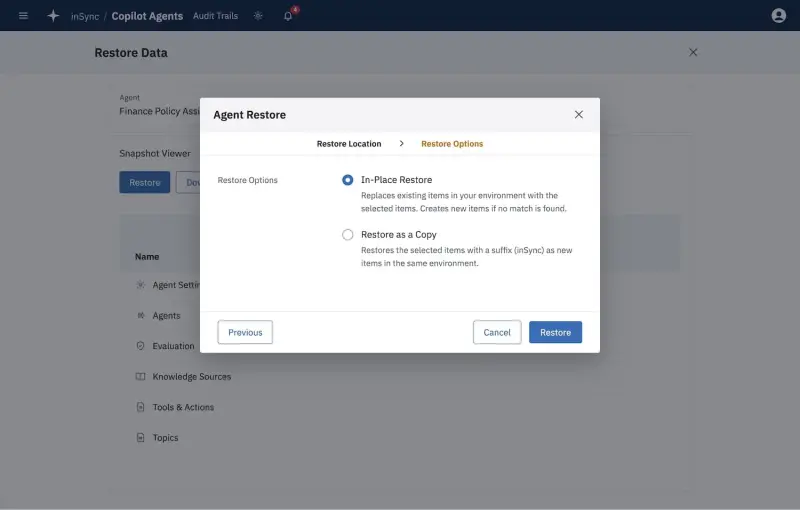
Backups run on policy-based schedules and land in The Resilience Cloud as immutable copies. Each agent gets its own version history. Administrators can restore one agent and its configuration without touching the rest of the environment, and the restore workflow offers two paths: put the agent back in place, or restore it as a copy alongside the original in the same environment. The copy option is useful when you need to compare a suspect version against a known-good one before deciding what to keep.
Druva frames the problem as a recovery gap. Its position is that a broken agent often forces a full environment restore or a manual rebuild, and both are slow and disruptive when other agents in that environment are working fine. Whether single-agent restore is the right answer for your estate depends on how many agents you run and how independent they are. Agents that share knowledge sources, connectors or flows will still need careful sequencing.
Why Druva Says Agents Belong on the Critical Systems List
Druva cites Microsoft figures showing that more than 80 percent of Fortune 500 companies use AI agents built with low-code or no-code tools. Those numbers come from Druva's citation of Microsoft, not from an independent survey, so treat them as context rather than a measured benchmark. The broader point holds up: once an agent handles approvals, answers customer questions or routes work, its outage becomes a business outage.
Druva introduced its AI Resilience portfolio earlier this year, with a goal of helping organisations recover, govern and defend AI-powered work. Agent Recovery is the first piece of that portfolio built specifically to restore agents. Ranga Rajagopalan, Chief Products and Marketing Officer at Druva, put the case this way:
“More business processes now run through AI agents, which makes those agents essential to how the business operates,” said Ranga Rajagopalan, Chief Products and Marketing Officer at Druva. “That puts them on the same list of critical systems every IT team backs up and recovers. With Agent Recovery, we’re now protecting the agents themselves, building on what we already safeguard across Microsoft 365 and Copilot conversations.”
Protecting the Dependencies Around an Agent
An agent is rarely one object. Copilot Studio agents depend on connected apps, flows, data sources and identities, and any of those can break the agent without the agent itself changing. A deleted Power Automate flow or a broken Power Apps connection can look like an agent fault to the business user, which is why backing up only the agent definition leaves a gap.
Druva now protects Microsoft Power Apps and Power Automate, extending the Power Platform coverage that began with Power BI. Teams can restore an individual app or flow from air-gapped, immutable backups without rebuilding it or rolling back the environment. Power Apps support is generally available. Power Automate support is in limited availability, so check its status before you plan dependencies around it.
Druva's coverage list also includes Microsoft 365, Copilot Chat conversations, Microsoft Entra ID, Microsoft Dynamics 365 and Salesforce. That breadth is the real argument for a single recovery path. When an agent fails, the root cause could sit in an identity, a CRM record or a chat history, and restoring the agent alone won't fix any of those. The company also points to its existing Azure workload protection, including the Azure VM backup Druva added in 2023, as part of the same footprint.
Backup Status Inside Azure SRE Agent and Microsoft 365 Copilot
The more unusual part of the announcement is where Druva's data shows up. Two integrations put backup information inside Microsoft's own tools, so administrators can check protection and retry failed jobs without opening a separate console.
The Azure SRE Agent integration uses Druva MCP to give Microsoft's operations agent backup health, protection status, recovery points and failed-job diagnostics for any Druva-protected workload. Azure SRE Agent correlates that data with Azure operational information to find unprotected workloads and suggest or take next steps during an incident. Druva calls it the first data protection integration with Azure SRE Agent. That's a vendor claim, and it's one to verify against your own tooling. The integration is scheduled for the end of November.
The Druva Agent for Microsoft 365 Copilot installs from the Agent Store and runs inside Copilot and Microsoft Teams. It shows a consolidated view of backup health, grouped failure analysis and remediation guidance. Because it draws on Copilot's Microsoft 365 context, it can show which users and groups a backup issue affects. Administrators can retry failed backups directly from Copilot. Druva describes it as the first backup and recovery agent for Microsoft 365 Copilot. The Copilot agent is generally available.
Availability and What to Check Now
Availability is mixed, and that matters for planning. Power Apps support and the Druva Agent for Microsoft 365 Copilot are generally available. Copilot Studio Agent Backup & Recovery and Power Automate support are in limited availability. The Azure SRE Agent integration is scheduled for the end of November. Druva plans to demonstrate Agent Recovery at Microsoft Ignite in San Francisco, November 17 to 20, at booth 5328.
If you run Copilot Studio agents at any scale, my read is that the first practical step is an inventory. Find out which agents exist, which environments they live in, and which connectors, flows and identities each one depends on. Backup scope is easier to set once you know the dependency map. Then ask two questions of any recovery product: can you restore one agent without rolling back its neighbours, and can you restore a copy for comparison before you overwrite anything? Druva's workflow answers both on paper. Test it against a non-production agent before you trust it with a live one.
The next thing to watch is how the limited-availability pieces mature. Single-agent restore for Copilot Studio is the core of this release, and it's still in limited availability. Once it's generally available, the question for most teams will shift from whether agents need backup to whether their existing recovery runbooks still make sense when an agent can be restored on its own.


