Dell Pro 7 13 2-in-1 Tested: 16 Cores and 64GB in a 1.38kg Convertible
Dell's Pro 7 13 2-in-1 matches its desktop sibling in short bursts and loads models a 32GB convertible can't, but sustained CPU load drops about 21 percent.
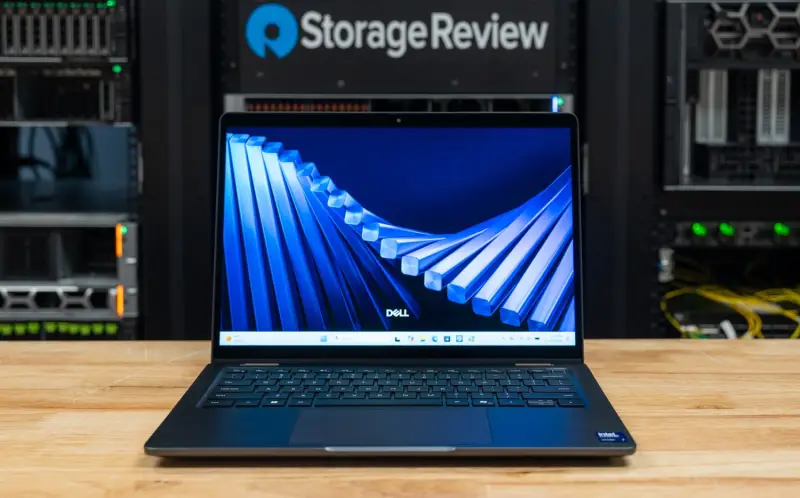
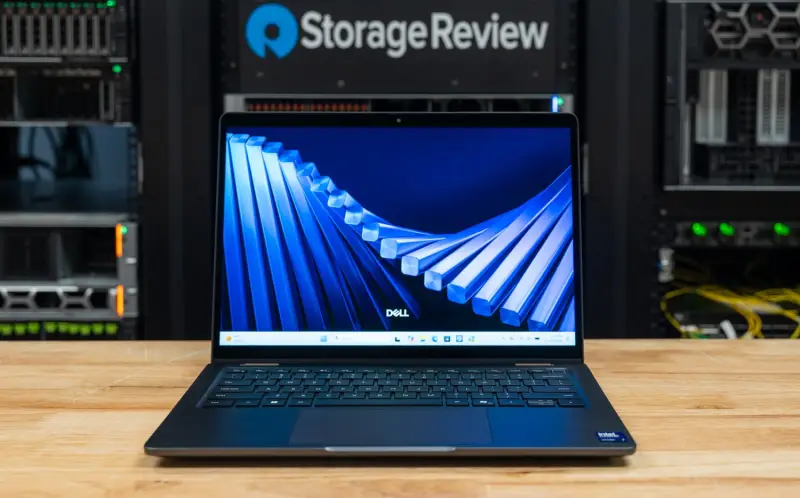
Most 13-inch business convertibles make you choose between a light chassis and real compute. The Dell Pro 7 13 2-in-1 tries to avoid that trade-off. It starts at 1.38kg (3.04lb), folds through laptop, tent, stand, and tablet modes on a 360-degree hinge, and in the configuration we looked at it carries a 16-core Core Ultra 7 366H, 64GB of LPDDR5X-8533, and a 1TB Gen5 self-encrypting SSD. The short version: in bursts it keeps up with the same processor in a desktop, and its memory opens up local AI workloads that 32GB convertibles simply can't load. The catch is that a thin chassis can't hold that performance for long.
Why the 64GB configuration is the story
The processor gets the headline, but memory is what sets this machine apart. Our review unit is model P703260, and its 64GB of soldered LPDDR5X-8533 pushes the integrated Intel Graphics to 47.6GB of GPU-usable memory as tested. That number matters more than the core count for local AI. In our comparison group, the 32GB ThinkPads top out at 18.1GB usable, which is the difference between running a 35B coding agent and not running one at all.
Teams in this position usually care about local inference for one of three reasons: data that can't leave the device, offline work, or avoiding per-token cloud costs. A 64GB convertible gives those teams a portable option that a 32GB machine can't match. It's also a reminder that memory capacity, not just processor generation, now decides what a laptop can do with a model.
Where the Pro 7 13 2-in-1 sits in Dell's lineup
The 2-in-1 is the convertible member of Dell's Pro 7 business line, alongside the clamshell Pro 7 13 and the Dell Pro 7 14. Dell positions it with the line "Laptop performance. Tablet flexibility." It's built on Intel's Core Ultra Series 3 processors, spanning the 8-core Core Ultra 5 325 and 335, the 12-core Core Ultra 5 336H, the 8-core Core Ultra 7 365, and the 16-core Core Ultra 7 366H in our unit.
The 366H combines four P-cores, eight E-cores, and four low-power E-cores, with a 4.8GHz maximum clock, integrated Intel Graphics, a 50 TOPS NPU, and vPro. Memory is soldered LPDDR5X-8533 in 16GB, 32GB, or 64GB. Storage runs from a 256GB Gen4 drive up to 1TB and 2TB Gen5 drives with self-encryption. On this model the display is a single choice: a 13.3-inch 16:10 WUXGA touch panel at 1920×1200, rated at 500 nits and 100 percent sRGB, with active pen support.
Build, hinge, and ports
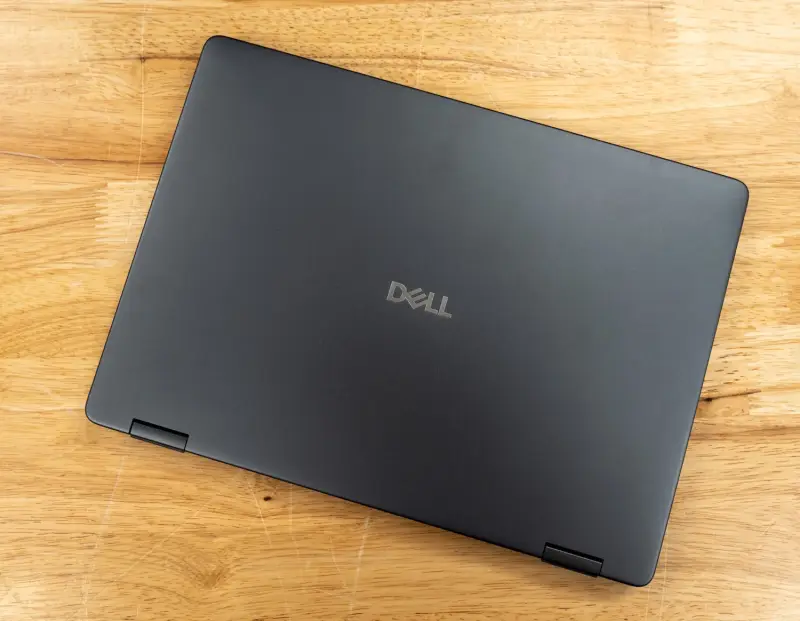
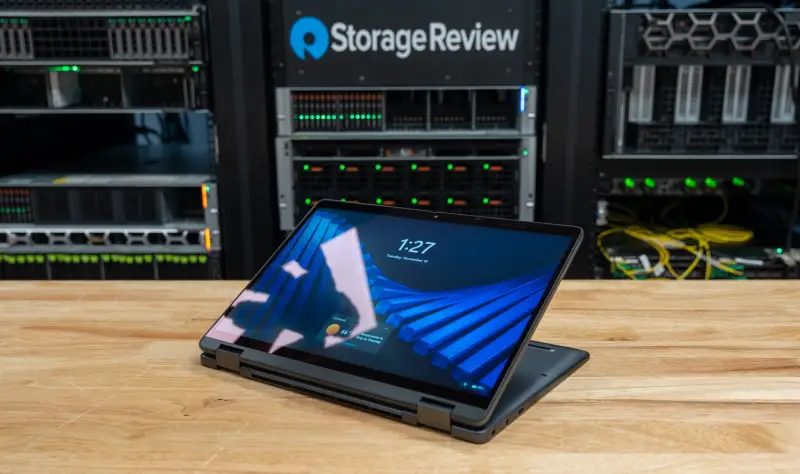
The chassis measures 300 x 216.3mm and tapers from 10.92mm at the front to 16.43mm at the rear, with a 17.95mm maximum. The lid and palm rest are aluminum and the bottom cover is magnesium. The hinge is the part I'd focus on in a real deployment. It's stiff enough to resist bouncing when the machine sits on a lap, which the team noted is firmer than the hinge on the Lenovo ThinkPad X1 2-in-1 Gen 11, where a slight bounce tipped the display back. In tent mode, though, the Dell slides a little on a smooth surface when the touchscreen is tapped. Our unit didn't ship with a pen, so pen performance is something to test with your own hardware.
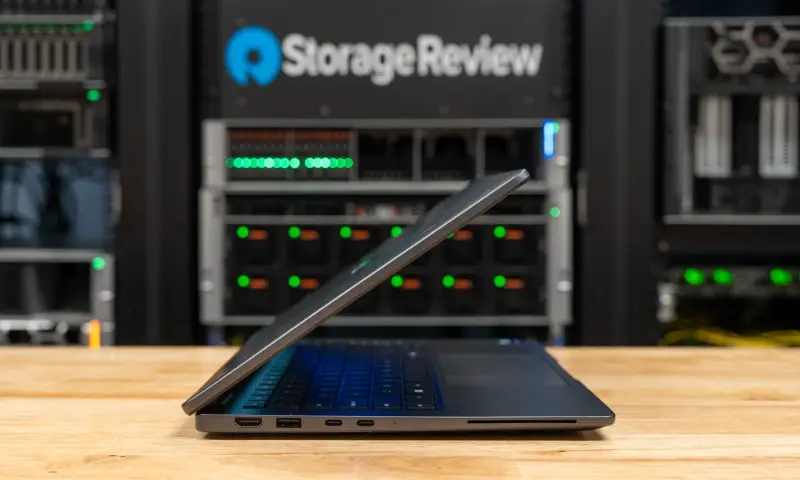
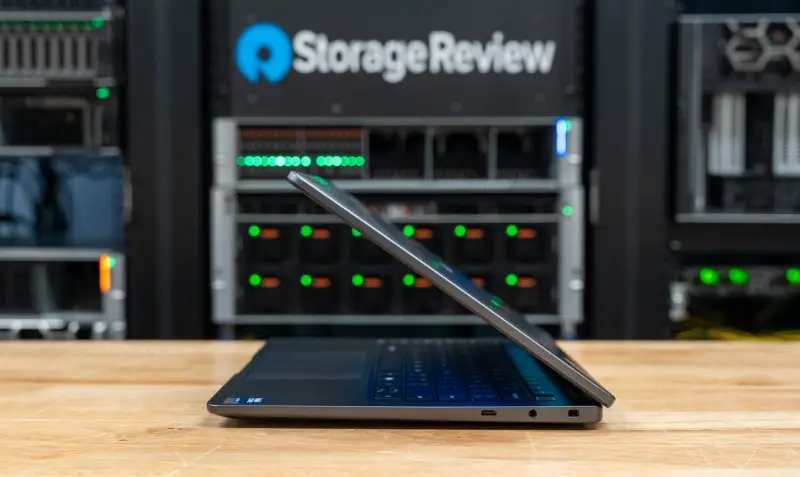
The left side carries HDMI 2.1, a USB-A port, and two USB-C ports, with a smart card reader toward the front. The right side has a third USB-C port, the headset jack, and a Kensington wedge lock slot. Dell's port specification lists two Thunderbolt 4 ports at 40Gbps with DisplayPort 2.1 and Power Delivery, one USB-C port at 20Gbps, and one USB-A port at 5Gbps. Wireless is Intel Wi-Fi 7 BE211, qualified against Bluetooth 6.0. Dell offers 4G and 5G modems on other configurations.
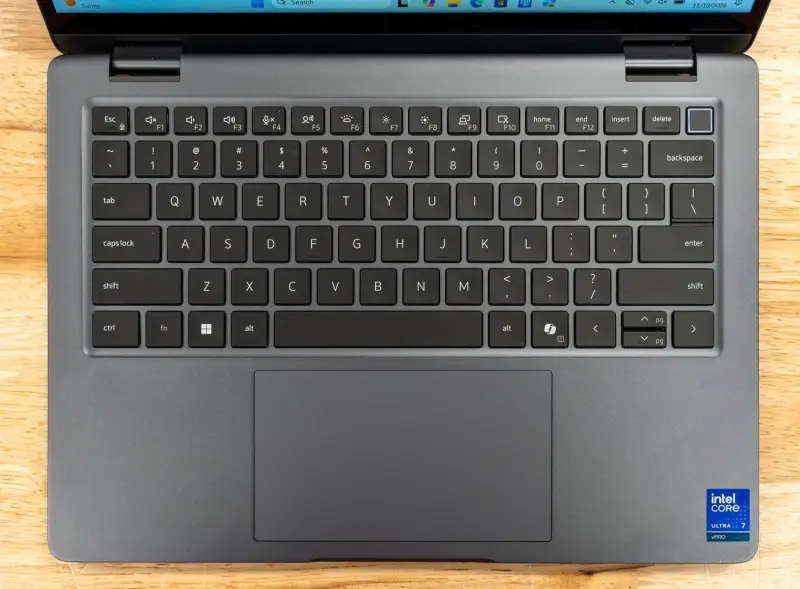
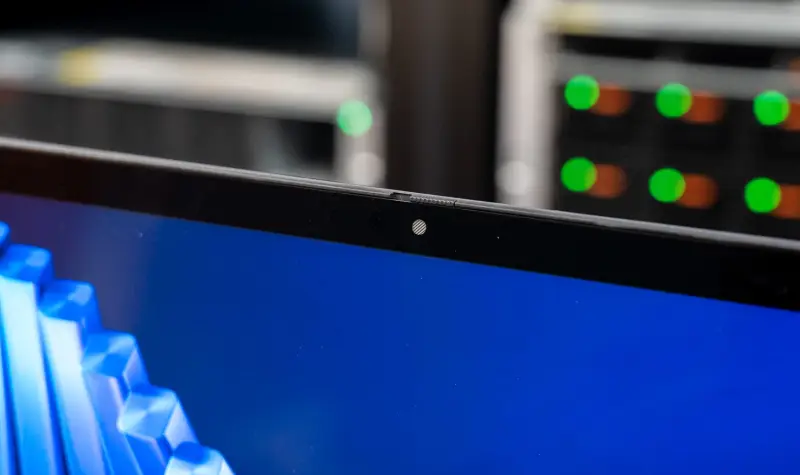
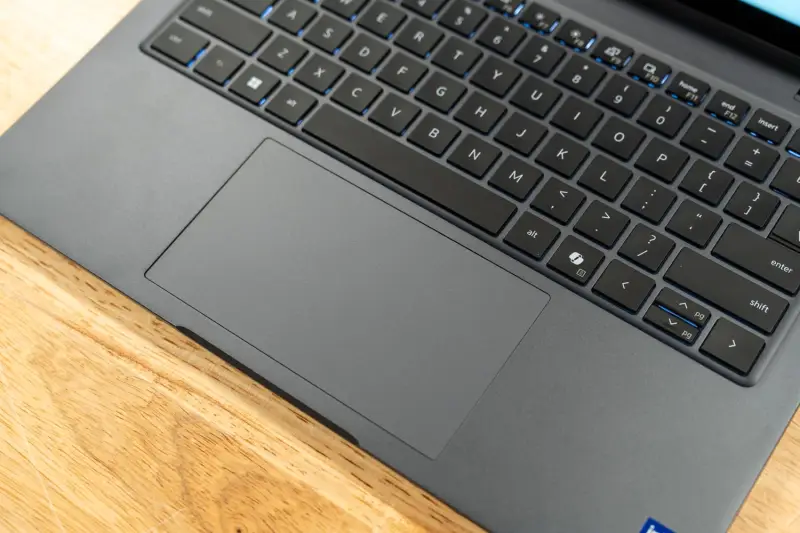
Input and authentication cover a mini-LED backlit keyboard with a Copilot key above a wide trackpad. Our unit adds a fingerprint reader. The FHD camera above the display has an IR sensor for Windows Hello, presence detection, temporal noise reduction, and a physical shutter. On the security side, Dell lists a FIPS 140-3 certified TPM, quantum-resistant BIOS verification, and a self-encrypting SSD. Intel's hearing accessibility features, which pair Bluetooth LE Audio with Auracast broadcast audio, are supported on this Wi-Fi platform too, and StorageReview plans a separate piece on that.
Serviceability: more open than the thin profile suggests
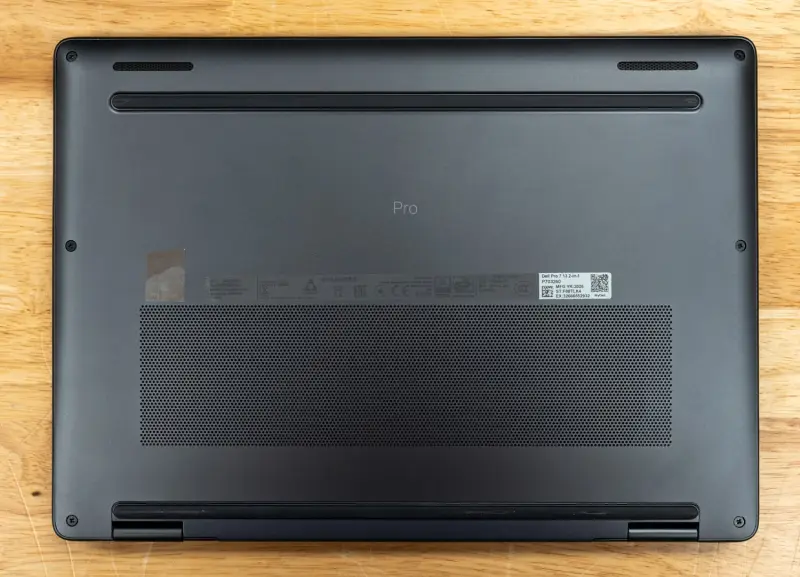
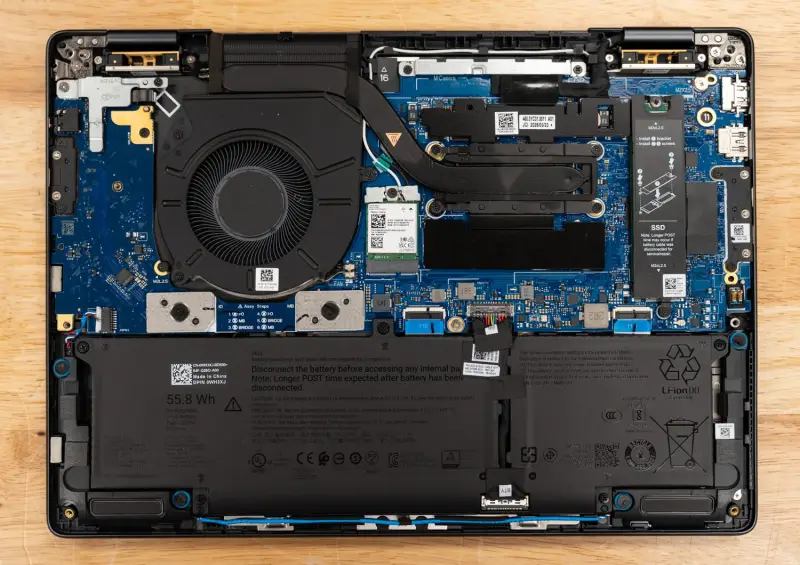
Six captive Phillips screws hold the bottom cover, and it comes off the way it does on most Dell notebooks. Memory is soldered, so the M.2 SSD is the main replaceable component. Dell also made the USB-C ports replaceable, each held by Phillips screws, a detail that matters on a machine that charges through those ports every day.
With the cover off, the unit shows a single fan and heat pipe over the processor, an M.2 Wi-Fi card, and an M.2 SSD under a shield at the right edge. The 55.8Wh three-cell battery runs along the front of the chassis between the two speakers. It supports ExpressCharge and ExpressCharge Boost from the 65W USB-C GaN adapter.
Test setup and the comparison group
The review unit runs Windows 11 Pro on BIOS 2.4.2 and Intel graphics driver 32.0.101.8991. Benchmarks ran on Best Performance power mode while plugged in, with Dell Optimizer set to its ultra performance mode. Results come from full, Peak-profile runs of sr-client, StorageReview's scripted client benchmark suite. The display sat at 50 percent brightness, sleep timers were off, and VBS and Memory Integrity stayed as shipped.
One limitation shapes the thermal analysis: the suite couldn't read a CPU temperature sensor on this system. It used fixed cool-down pauses between tests, so the thermal conclusions rest on clock speeds and scores rather than temperatures.
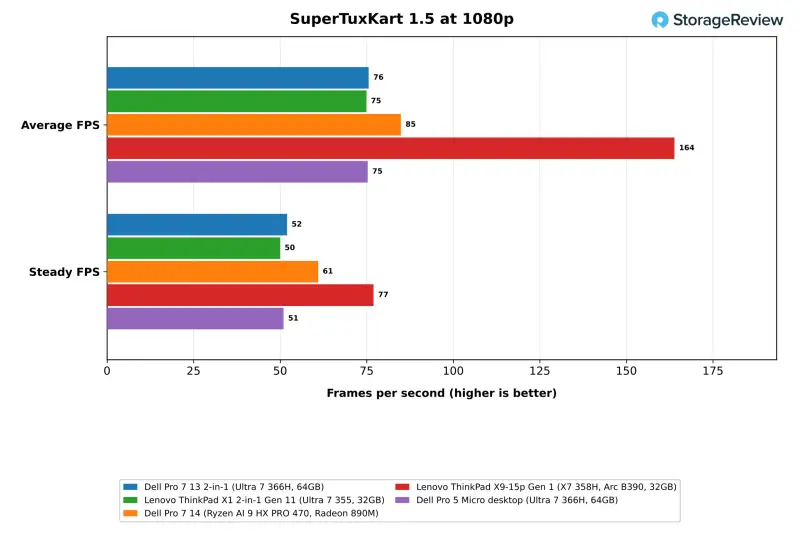
The closest rival is the Lenovo ThinkPad X1 2-in-1 Gen 11, a 14-inch business convertible with an 8-core Core Ultra 7 355 and 32GB. The Dell Pro 5 Micro runs the same Core Ultra 7 366H and 64GB in a desktop chassis, which isolates what the convertible's cooling costs. The Dell Pro 7 14 brings AMD's 12-core Ryzen AI 9 HX PRO 470 with Radeon 890M graphics, and the Lenovo ThinkPad X9-15p Gen 1 adds the 16-core Core Ultra X7 358H with Arc B390 graphics and 32GB.
Bursts versus sustained load
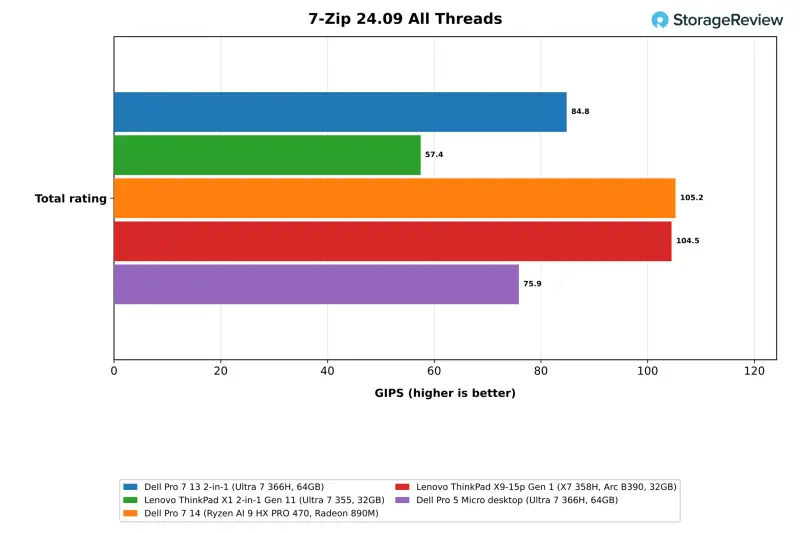
On short runs, the 366H performs like it does in a desktop. The Cinebench 2026 multi-core score of 3,657 sits just above the Pro 5 Micro's 3,601, and the 2-in-1 finished 40 percent ahead of the 8-core Core Ultra 7 355 in the ThinkPad X1. Single-core landed at 500, second only to the X9-15p's 511. The 2-in-1 also ran 7-Zip 12 percent ahead of the Pro 5 Micro.
Sustained load is where the thin chassis shows. Across a 30-minute Cinebench loop, the first pass scored 3,005, already 18 percent below the standalone multi-core result. The following passes held between 2,901 and 2,911 at mean clocks of 2,071MHz to 2,096MHz. The steady state works out to about 2,900 points, 21 percent under the burst score. The Pro 5 Micro sustained 3,352 with the same processor, 7 percent under its own burst score, and the X1 2-in-1 and other notebooks held their first-pass numbers. The steady-state-to-first-pass ratio of 0.967 in the table reflects a first pass that had already slowed.
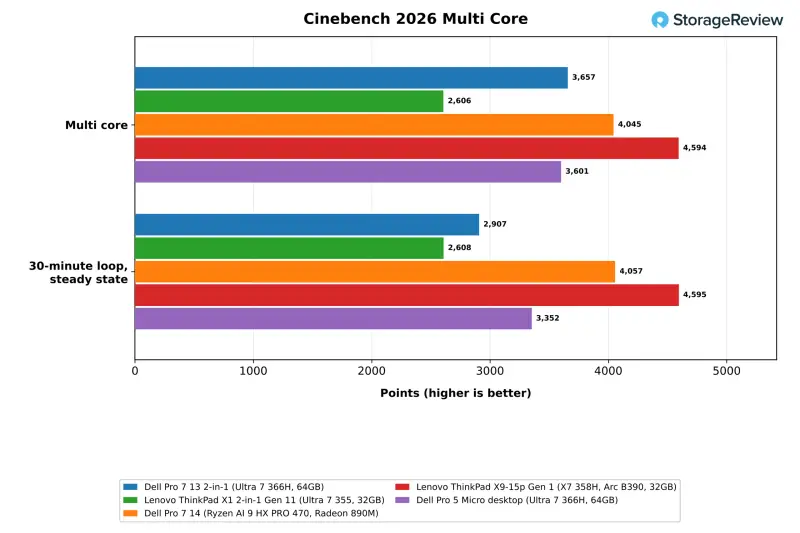
Clock data tells the same story. On short tests the 2-in-1 and the Pro 5 Micro run close together. Over the long Cinebench loop, the 2-in-1's steady-state mean clock was 2,082MHz against 2,449MHz on the desktop, roughly 15 percent lower. During LLM serving the gap widened to 2,617MHz against 3,615MHz, about 28 percent lower, because the graphics and CPU share the same heat budget in this chassis.
Here's the thing: most office work lives in those bursts. Browsing, documents, and conferencing sit well within what this machine delivers. Its Speedometer 3.1 score of 41.6 landed between the Pro 5 Micro at 42.2 and the X9-15p at 40.8, and it ran PyPerformance go in 76.4ms, level with the other Intel systems. Browser, office, and conferencing work runs within 2 percent of the fastest system in the group, which is the workload the machine is built around.
Multi-threaded work and memory bandwidth
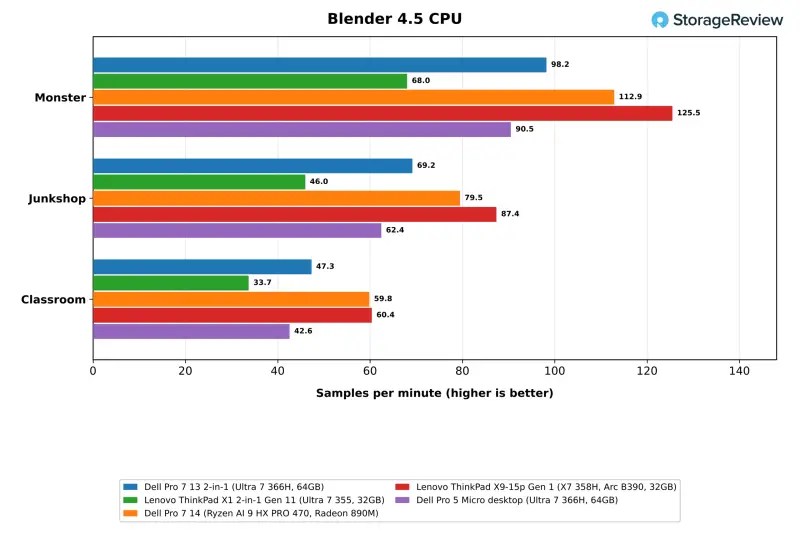
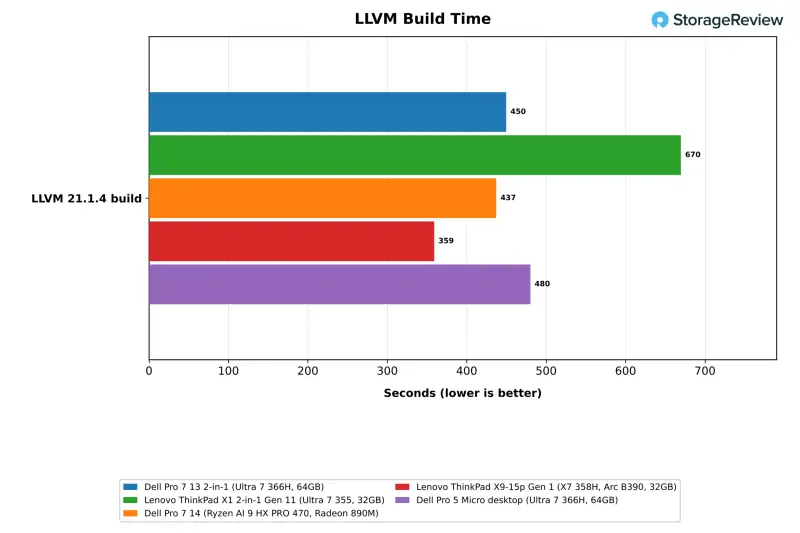
Shorter multi-threaded tests stay clear of that plateau. The 2-in-1 scored 84.8 GIPS in 7-Zip's all-thread test and 98.2 samples per minute in Blender's Monster scene. That's 12 percent and 9 percent ahead of the Pro 5 Micro, and 48 and 44 percent ahead of the X1 2-in-1. It finished the LLVM build in 450 seconds, 6 percent quicker than the Pro 5 Micro, while the Dell Pro 7 14 took 437 seconds and the X9-15p took 359.
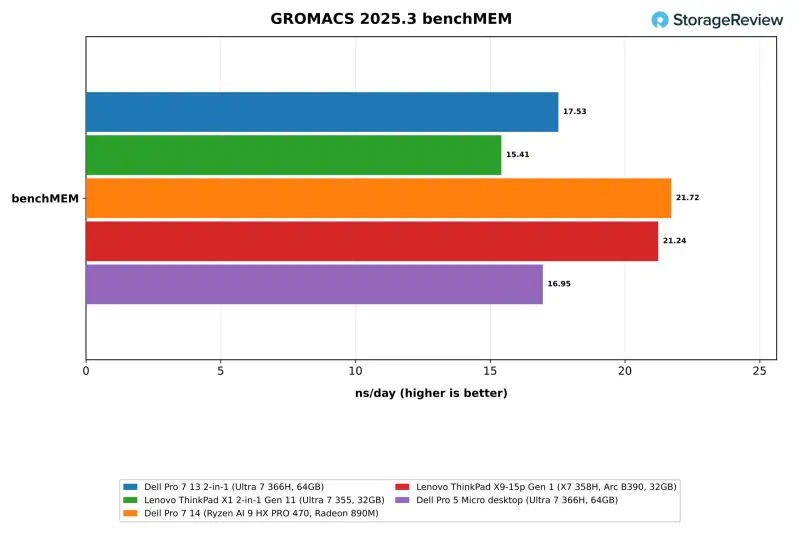
Memory helps here too. LPDDR5X-8533 reached 82.4GB/s in STREAM Triad, 40 percent above the Pro 5 Micro's DDR5-5600 with the same processor, and second only to the X9-15p's LPDDR5X-9600. Memory latency measured 116.3ns. GROMACS benchMEM ran at 17.53 ns/day, 3 percent ahead of the Pro 5 Micro, while OpenBLAS DGEMM reached 347.0 GFLOPS against 469.2 on the X9-15p.
Local AI: fast loads, slow prompts
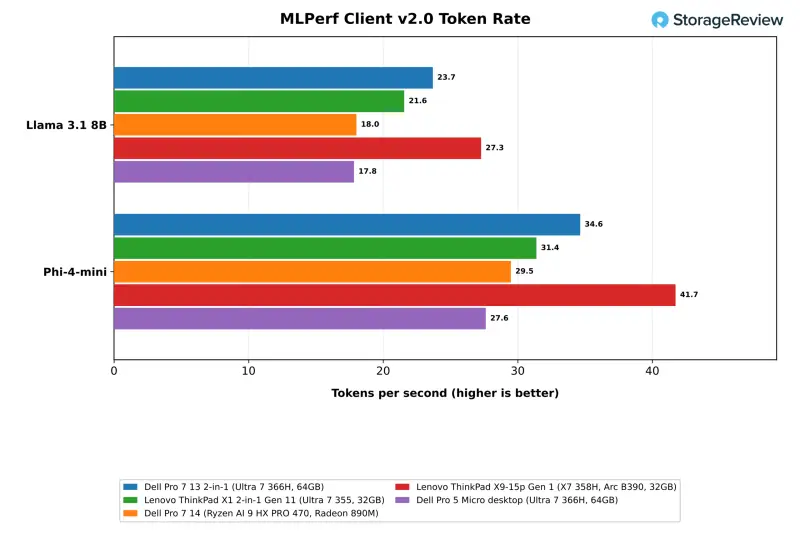
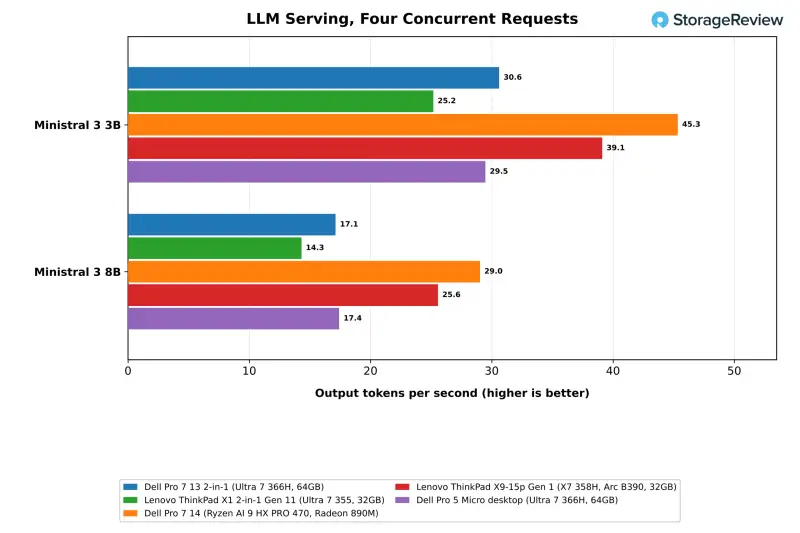
Local AI runs on the 366H's integrated Intel Graphics and shared memory, and this is where the 64GB configuration earns its cost. The 2-in-1 leads the X1 2-in-1 by 10 percent in MLPerf Client and by about 20 percent in four-request serving. It trails the Arc B390 in several tests, and it trails the Radeon 890M in RAG, serving, and image generation while leading it in MLPerf Client.
In MLPerf Client v2.0, the 2-in-1 generated 23.7 tokens per second on Llama 3.1 8B and 34.6 on Phi-4-mini. That's 10 percent ahead of the X1 2-in-1 on Llama 3.1 8B and 33 percent ahead of the same 366H in the Pro 5 Micro. The X9-15p's Arc B390 led at 27.3 tokens per second on Llama. Dell's Pro 7 14 ran MLPerf through Windows ML with DirectML, while the Intel systems used OpenVINO, so those columns compare engines as well as hardware.
Model loading is the standout. With gpt-oss:20b on Ollama 0.40.3, the 2-in-1 loaded in 6.46 seconds cold and 4.64 seconds warm, the fastest cold load in this group. The team attributes that partly to the Gen5 SSD. In the coding agent test, it passed all three runs at the 64K tier at 14.2 tokens per second. Its median wall time of 1,124 seconds reflects long, multi-round runs, so the agent works, but patience is required. With 47.6GB available, it also completed the larger tier, passing all three runs on a 35B model at 25.5 tokens per second. The 32GB ThinkPads can't load that model.
Running Speedometer alongside the agent, the browser score slowed 1.25 times. That's close to the X9-15p's 1.26 times and between the X1 2-in-1's 1.18 times and the Pro 5 Micro's 1.40 times. The agent slowed to 1.13 times in that pairing and generated 14.0 tokens per second while the browser test ran.
Retrieval-augmented generation tells a similar story. The RAG test embeds 20,963 SQuAD passages and answers with Phi-4-mini. The 2-in-1 ingested 44.4 passages per second, generated answers at 35.6 tokens per second, and returned a median of 1.57 seconds from question to answer, in line with the X1 2-in-1. The Dell Pro 7 14 ingested 18 percent faster at 52.3 passages per second, and the X9-15p was 88 percent faster at 83.6.
Prompt processing is the weak point. On the llama.cpp server with Ministral 3 3B, the 2-in-1 delivered 14.8 tokens per second to one user and 30.6 across four requests. On the 8B model it managed 9.9 and 17.1. But its median time to first token was 13.9 seconds on the 3B model and 21.9 seconds on the 8B model, against 4.6 and 9.2 seconds on the Radeon 890M in the Dell Pro 7 14. For anyone expecting snappy responses to long prompts, that gap is the thing to test first.
Larger models hit the ceiling. Qwen3.8 27B fit inside the 47.6GB and ran at 2.63 tokens per second for one user and 4.62 across four requests, with a median of 111 seconds to the first token. The eight-request run timed out twice at the suite's one-hour limit. The Dell Pro 7 14 ran the same model at 3.61 tokens per second for one user. On image generation, the 2-in-1 produced 0.94 images per minute with FLUX.2 klein 4B at Q4_0, about 64 seconds per image. That's ahead of the X1 2-in-1 and the X9-15p, behind the Radeon 890M at 1.79 images per minute. It also completed Qwen-Image 20B at Q4_0 at 0.07 images per minute. The BF16 version needs 60GB of GPU-usable memory and didn't run.
Storage: the Gen5 drive
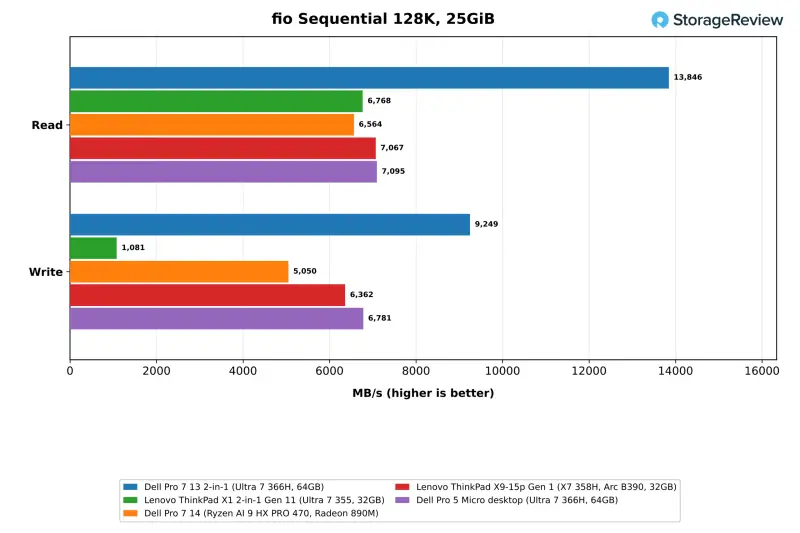
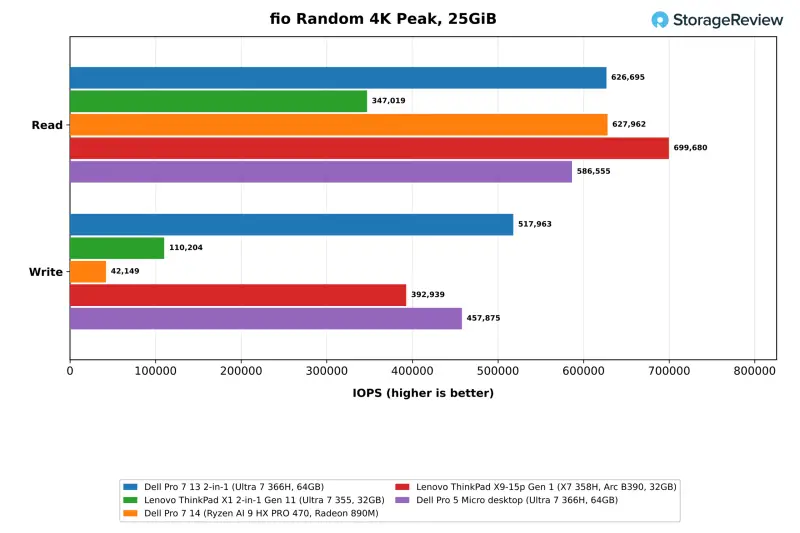
The 1TB Gen5 SSD is the fastest drive in this group by a wide margin on sequential reads. It read at 13,846MB/s, roughly double the drives on Gen4 links in every comparison system, and wrote at 9,249MB/s. Peak random performance reached 626,695 read IOPS and 517,963 write IOPS. Some random write results were flagged for run-to-run variance after a rerun, and the eight-job write result came back clean at 509K IOPS.
For a convertible, that's far more drive performance than office work needs. It does explain the quick model loads, though. Anyone who moves large model files or datasets around will notice the difference between this drive and a Gen4 one.
Pricing and who it's for
The 2-in-1 starts at $2,301 on Dell.com with a Core Ultra 5 335 and 16GB. Building the tested configuration adds $530 for the 366H, $1,610 for 64GB of memory, and $620 for the 1TB Gen5 drive. Dell also bundles three years of ProSupport with onsite service. With the FHD IR camera, fingerprint reader, and smart card reader, the total came to $5,501 at the time of writing. Memory is the largest single driver of that gap.
For comparison, reseller CDW charges $2,884.99 for the ThinkPad X1 2-in-1 we tested. The Dell configuration costs nearly twice that, and most of the difference sits in the memory option and the Gen5 drive. Those are the two components doing the most work in this machine, so the premium follows from what it does.
My read: this fits a pen-capable 13-inch convertible for executives and field staff who need a lightweight machine with real burst performance, and who want the option of running mid-sized local models. It doesn't fit sustained rendering, long compile jobs, or heavy local AI sessions that run for hours. Those buyers will get more from the Dell Pro 7 14 or a desktop such as the Pro 5 Micro. The 2-in-1's ports and drive are easy to live with. Its thermals are the part to plan around.
Before you commit, run your own workloads. Pay particular attention to first-token latency with large prompts, sustained multi-core jobs, and the pen and tent-mode behavior on your desks. If those hold up, the 64GB configuration gives this 1.38kg convertible something most of its class can't offer: room to run models locally without a desktop on the desk.


