ASUS ProArt GR1X Review: RTX Spark N1X Mini PC Runs Cooler Than Laptops
ASUS's 1.15-litre GR1X holds sustained CPU speed better than the RTX Spark laptops we tested, with two M.2 2280 slots for storage. Its 1TB Gen4 drive is the weak point.
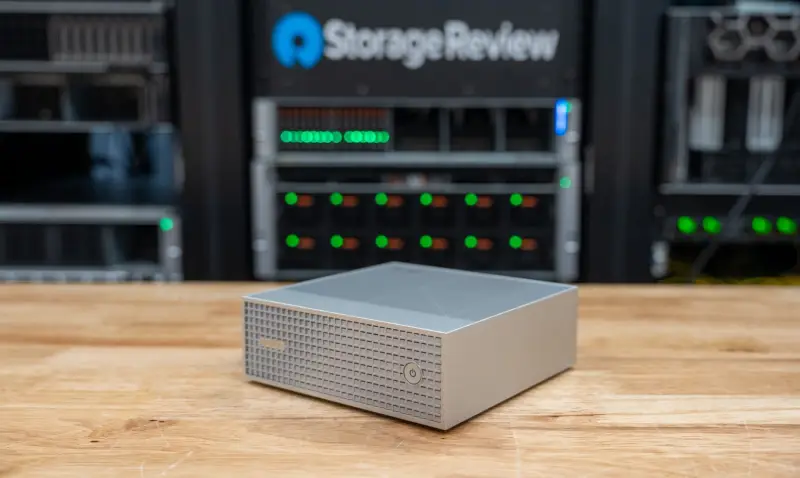
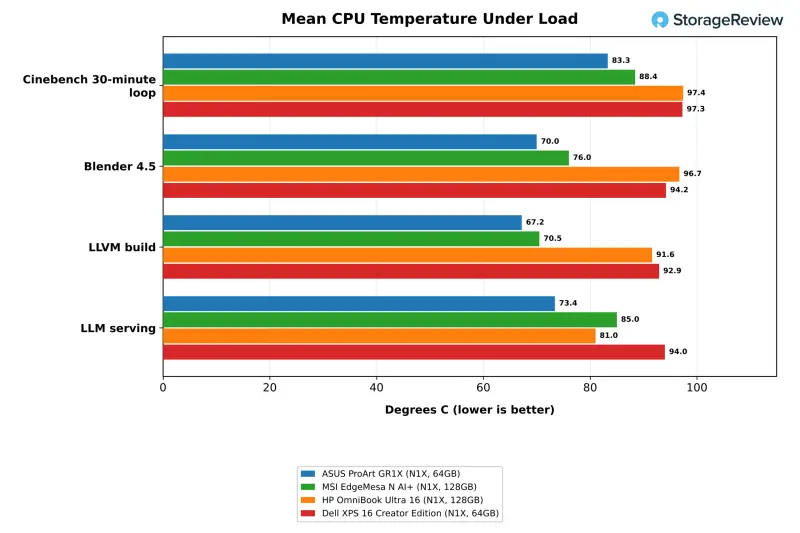
The ASUS ProArt GR1X squeezes NVIDIA's RTX Spark N1X into a 150mm-square desktop of 1.15 litres, and the number that matters most is its temperature. Under a 30-minute Cinebench loop it averaged 83.3C and peaked at 88.7C. The two RTX Spark laptops in the comparison both averaged 97C and sat at their 98C limit, and the chip inside all three is the same 20-core part. That gap is the reason to look at this desktop, and it's more useful to a buyer than any single benchmark score.
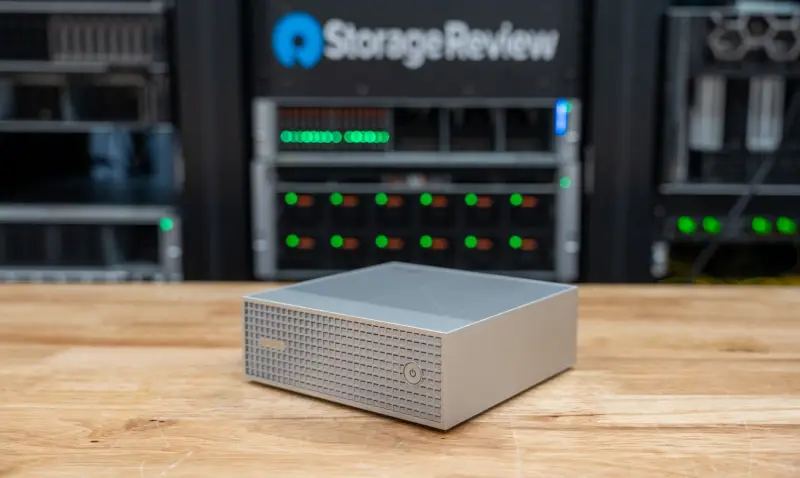
The GR1X also has something most compact Windows desktops lack: two full M.2 2280 slots. The second slot takes a standard retail drive, which matters because the 1TB Gen4 SSD in the test unit was the slowest part of the system for cold model loads. The test unit was the 64GB configuration with that 1TB drive and Windows 11 Pro 26H1, and the results below apply to that build. Memory is the other decision, and the 64GB model has a ceiling that the 128GB configuration doesn't.
Where the GR1X Fits in ASUS's RTX Spark Lineup
ASUS sells RTX Spark systems under its ProArt creator brand. The GR1X is the desktop in a family that also includes the 16-inch ProArt P16 and the 14-inch ProArt P14 laptops. ASUS separately sells the Ascent GX10, a DGX Spark system that runs NVIDIA's Linux-based DGX OS for AI development. The GR1X is the Windows counterpart. ASUS aims it at prosumers, AI-powered creators, workflow builders, developers and gamers who want local agents running inside everyday Windows applications.
The GR1X comes with 64GB or 128GB of LPDDR5X-9400 unified memory, in black or silver, and with either Windows 11 Home or Windows 11 Pro. The bundled software includes ProArt Creator Hub, the StoryCube and MuseTree creative applications, validated ComfyUI workflows and a three-month Adobe Creative Cloud subscription.
In the US, ASUS sells the GR1X through its eShop, Best Buy, Micro Center, Central Computers and Amazon. The 64GB model with a 1TB Gen4 SSD and Windows 11 Home is listed at $4,499 on the ASUS eShop and $4,499.99 at Best Buy, where a 2TB version costs $4,999.99. The eShop showed the system as out of stock when the lab checked, and Best Buy listed it as coming soon. NVIDIA said RTX Spark desktops start at $4,399, which puts the 64GB GR1X $100 above that entry price.
ASUS credits the platform with up to 1 petaFLOP of FP4 AI performance, 120B-parameter LLMs with up to 1 million tokens of context, 3D scenes up to 90GB and 1440p gaming above 100 fps. ASUS's RTX Spark overview treats the model figures as capacity guidance that assumes suitable quantization, and it links 70B and 120B-class models to the 128GB configuration. That qualifier matters here. The 64GB unit can't be read as proof of what the 128GB model handles.
Design, Ports and Build
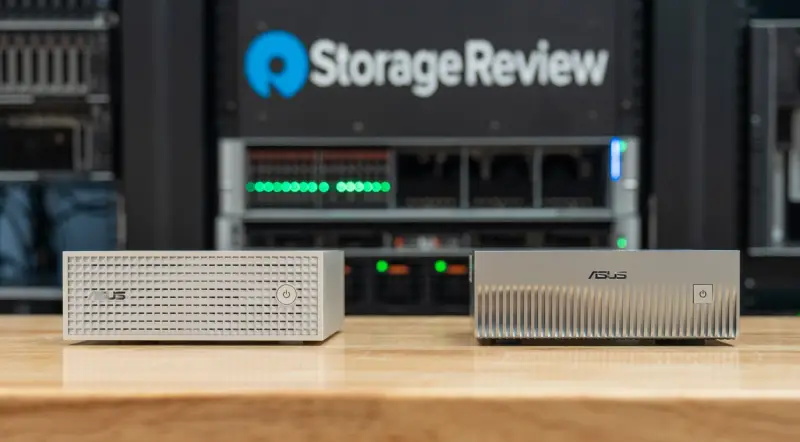
The GR1X measures 150 x 150 x 51mm and weighs 1.48kg, which gives the 1.15-litre volume. ASUS quotes 1.1 litres. MSI's EdgeMesa N AI+, the other RTX Spark mini PC in this comparison, measures 152 x 147 x 53mm, weighs 1.32kg and works out to 1.18 litres. The two take up about the same footprint on a desk, and the ASUS is roughly 160g heavier.
The black version has an anodized finish and the silver version is sandblasted. Both carry an anti-fingerprint matte coating, and the Wi-Fi antenna sits under a textured, glass-like panel. The front has a single control, a power button with an LED. Power arrives over USB Type-C from a 240W adapter, so the chassis has no barrel connector.
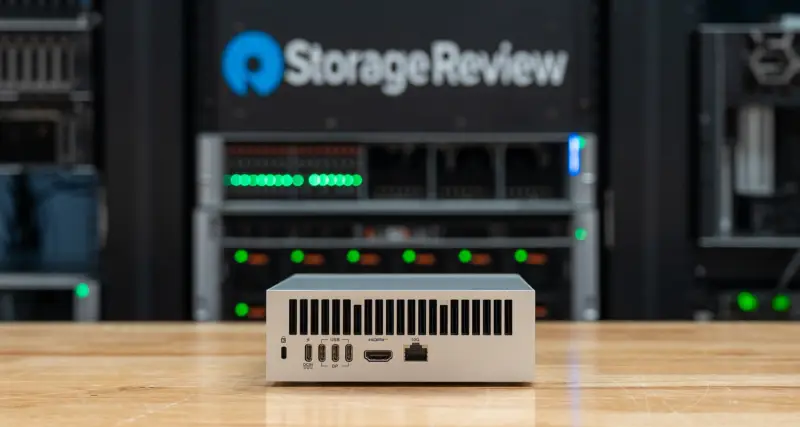
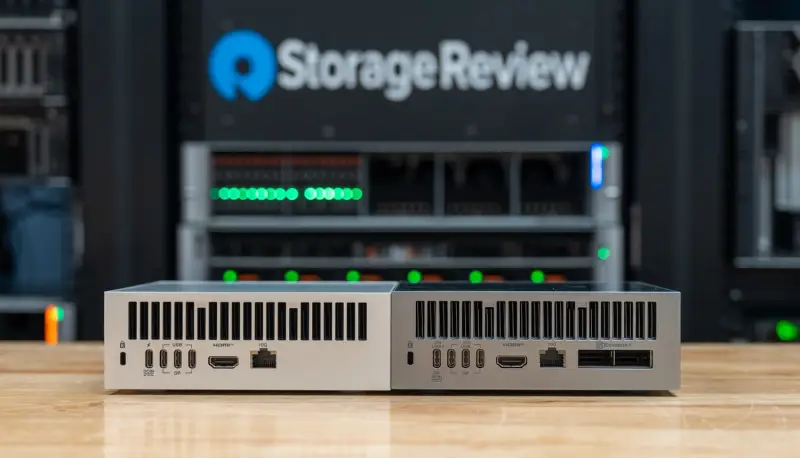
Every port sits on the rear panel: four USB Type-C ports at 20Gbps, HDMI 2.1, a 10GbE RJ45 port and a Kensington lock slot. Three of the Type-C ports support DisplayPort Alt Mode. The fourth is the power input under the USB PD 3.1 EPR specification. Wireless is Wi-Fi 7 with a 2×2 radio and Bluetooth 5.4. The system drives up to four displays, using HDMI and the three DisplayPort-capable Type-C ports.
ASUS lists no USB Type-A port, no audio jack and no front-panel USB. Most desks will need a hub or dock, and anyone with older peripherals should plan for that before the box arrives.
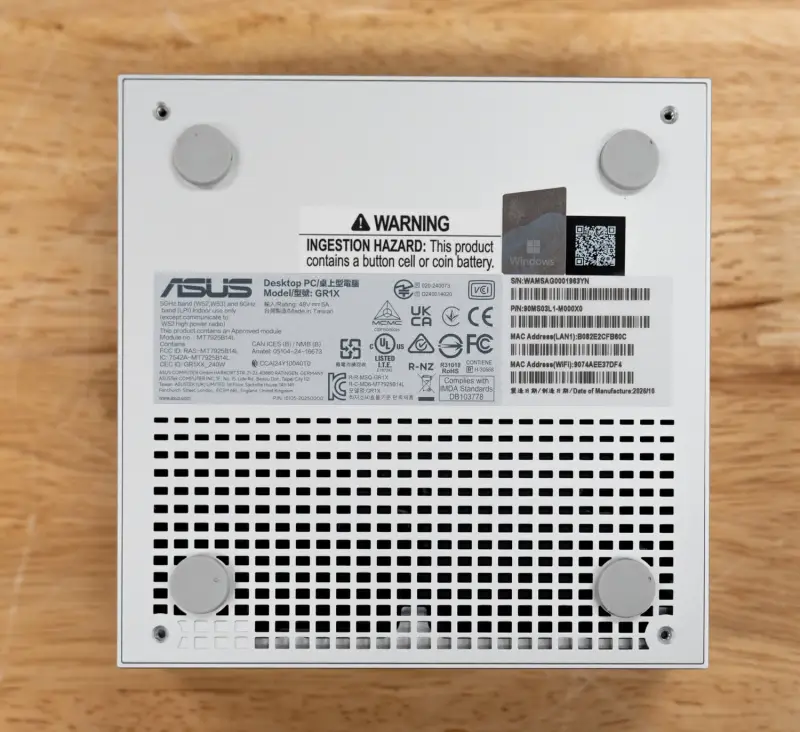
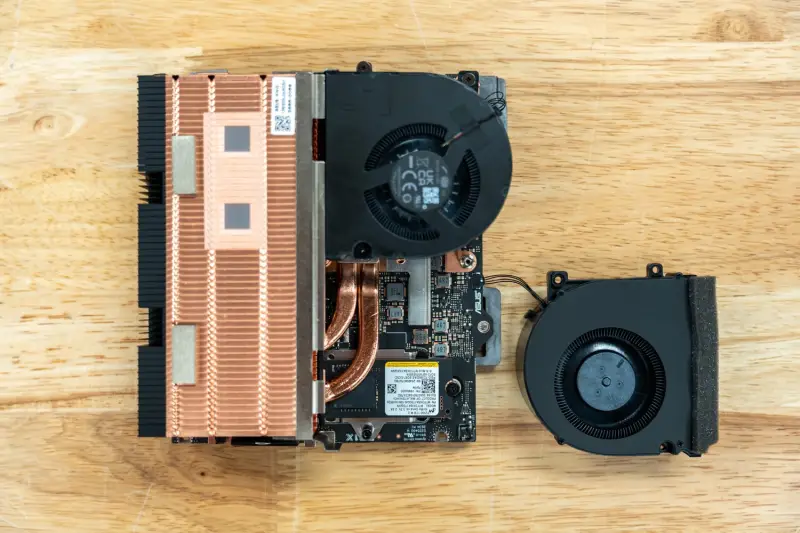
The cooler is a dual-fan design. It pulls air through vents in the base and pushes it across 57 fins fed by four heat pipes. ASUS specifies 109 blades per fan and says the system is built to sustain 140W. The company adds that owners will rarely notice thermal throttling, even at 25C to 30C ambient. That's a vendor claim, and the sustained tests below are the check on it.
Storage: Two Slots and One Weak Drive
Two full-length M.2 slots are rare in a box this size, and they're the design feature I'd put first on a buyer's list. The chassis takes two M.2 2280 drives, and ASUS lists support for PCIe 5.0 and 4.0 drives up to 4TB in total. The 2280 length is the most common retail size for Gen4 and Gen5 SSDs. A buyer can add a second drive for models and datasets, or replace the boot drive with an off-the-shelf part.
ASUS's factory options are a 4TB Gen5 drive and 1TB or 2TB Gen4 drives. The test unit shipped with a 1TB Micron drive on a PCIe Gen4 x4 link. The primary slot sits on the motherboard under the CPU fan structure. The second slot is on the underside of the board. It was empty in the test unit and is easy to reach once the bottom plate is off. Limited storage has been the main shortcoming of the GB10 systems the lab has tested, since many ship with a single short M.2 drive. An open second slot changes that.
The test unit's drive is the part I'd upgrade first. It performs like a Gen4 device, and that shows up in both cold model loads and random writes. The Gen5 drive option is the factory fix, and a second slot gives a buyer room to add capacity without giving up the boot drive.
ASUS ProArt GR1X Specifications
| Component | ASUS ProArt GR1X |
|---|---|
| Processor | NVIDIA RTX Spark N1X, 20-core Arm CPU (two classes of 10 cores) |
| Graphics | 6,144-core NVIDIA Blackwell RTX GPU, integrated; up to 1 petaFLOP FP4 (ASUS) |
| Memory | 64GB or 128GB LPDDR5X-9400 unified memory; 64GB as tested |
| GPU memory as tested | 30.5GB dedicated, 16.2GB shared (default allocation) |
| Storage | 2x M.2 2280 NVMe slots, PCIe 5.0/4.0, up to 4TB; 1TB Micron MTFDKBA1T0QGN on PCIe Gen4 x4 as tested |
| Operating system | Windows 11 Home or Pro; Windows 11 Pro 26H1 as tested |
| Rear ports | 3x USB Type-C 20Gbps with DisplayPort Alt Mode; 1x USB Type-C 20Gbps with PD 3.1 EPR input; 1x HDMI 2.1; 1x 10GbE RJ45 |
| Front | Power button with LED |
| Display outputs | Up to four displays over HDMI and 3x USB Type-C |
| Networking | 10GbE; Wi-Fi 7 (2×2); Bluetooth 5.4 |
| Security | Kensington lock slot |
| Cooling | Dual fans, 109 blades each; 57 fins, 4 heat pipes; built to sustain 140W (ASUS) |
| Power | 240W USB Type-C adapter |
| Dimensions and weight | 150 x 150 x 51mm (1.15L); 1.48kg (3.26 lb) |
| Colours | Black, Silver |
| Price | $4,499 (64GB, 1TB, Windows 11 Home, ASUS eShop); $4,999.99 (64GB, 2TB, Best Buy) |
Test Setup and Memory Allocation
The GR1X was tested as it arrived: the RTX Spark N1X, 64GB of LPDDR5X-9400, the 1TB Micron SSD on a PCIe Gen4 x4 link and Windows 11 Pro 26H1 on Arm. The power mode was set to Best performance, and a 4K external monitor was attached for the run. Windows assigned 30.5GB of the unified memory to the GPU as dedicated memory and another 16.2GB as shared.
That memory is one physical pool. Windows treats the GPU allocation as dedicated GPU memory and the rest as system memory, which the GPU can spill into when a workload needs more. An NVIDIA app slider sets the split. The default sits close to an even division on 64GB and 128GB RTX Spark systems, and the app warns that extreme minimum or maximum settings may cause problems. NVIDIA advises keeping the default unless a workload needs more, since a larger GPU share leaves less memory for Windows and other applications. It recommends leaving at least 16GB for the CPU.
NVIDIA says agents and LLMs lose little performance when they spill into system memory. It suggests raising the allocation for image and video generation models that outgrow the default. Every system here was tested at its default. The suite sizes model tiers to the dedicated amount, so a model skipped on a 64GB system might still run there with spillover or a larger allocation. Keep that in mind when reading the model tables.
All results come from sr-client 1.13, a Windows client suite covering local AI, content creation, CPU, graphics and storage. LLM serving and MLPerf Client ran through llama.cpp on CUDA. Model loading, the coding agent and RAG ran through Ollama on CUDA. Image generation ran through stable-diffusion.cpp on Vulkan. Results are medians of repeated passes, and the newest valid result is used where a test ran more than once. An asterisk marks a result the suite flagged for a failed pass or high run-to-run variance. The two laptops were tested earlier, on sr-client 1.11.
The comparison set has three machines. The first is MSI's EdgeMesa N AI+, a 1.18-litre desktop with 128GB of memory and a 4TB Samsung Gen5 SSD. It ran the same sr-client 1.13 release. The other two are the fastest RTX Spark laptops tested at each memory size: the 128GB HP OmniBook Ultra 16 with a 2TB Sandisk Gen5 SSD, and the 64GB Dell XPS 16 Creator Edition with a 1TB SK hynix drive.
The XPS 16 is the direct match for the GR1X on memory, and the EdgeMesa and HP show what the larger configuration adds. All four use the same 20-core N1X. The two desktops run it at a higher power limit under bigger coolers, so power, cooling, memory and storage are the variables. An x64 build of Cinebench crashed under emulation on all four machines, so no emulation results appear.
Sustained Performance and Thermals
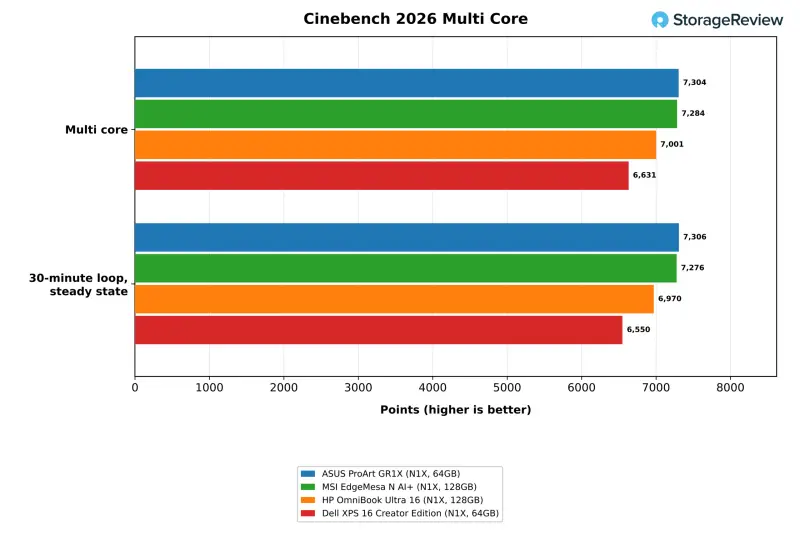
A mini PC has to win the sustained test, and the GR1X did. The loop renders the Cinebench 2026 multi-core scene continuously for 30 minutes. The GR1X finished at 7,306 points in steady state, 1.007 times its first pass, so it showed no throttling. The HP held 6,970 and the XPS 16 held 6,550, which puts the ASUS 5 and 12 percent ahead. Mean steady-state clock was 3,385MHz on the GR1X, against 3,239MHz on the HP and 3,083MHz on the XPS 16. The EdgeMesa held 7,276 points at 3,372MHz, level with the ASUS.
| Cinebench 2026 (points unless noted) | ASUS GR1X (64GB) | MSI EdgeMesa N AI+ (128GB) | HP OmniBook Ultra 16 (128GB) | Dell XPS 16 CE (64GB) |
|---|---|---|---|---|
| Single core | 553 | 548 | 561 | 565 |
| Multi core | 7,304 | 7,284 | 7,001 | 6,631 |
| 30-minute loop, steady state | 7,306 | 7,276 | 6,970 | 6,550 |
| Loop CPU temperature, mean / max (C) | 83.3 / 88.7 | 88.4 / 107.3 | 97.4 / 98.2 | 97.3 / 98.3 |
| Steady-state CPU clock, mean (MHz) | 3,385 | 3,372 | 3,239 | 3,083 |
Temperature separates these machines more than the scores do. Both laptops averaged 97C for the full loop and sat at their 98C limit. The GR1X averaged 83.3C and peaked at 88.7C, nearly 10C under that limit while running a higher clock. The EdgeMesa matched the ASUS's score at an 88.4C average, about 5C warmer, and its peak reached 107.3C.
A single multi-core run shows the same order against the laptops: 7,304 points against 7,001 and 6,631, leads of 4 and 10 percent. Single-core scores were 553 on the GR1X, 548 on the EdgeMesa, and 561 and 565 on the laptops. That's a 3 percent spread that slightly favours the laptops, which fits a test that never loads the cooler.
Temperatures Across the Suite
The loop's pattern holds across every CPU test. The GR1X averaged 70.0C in Blender, 67.2C in the LLVM build, 66.5C in HandBrake and 55.4C in 7-Zip. The laptops averaged between 78C and 97C in those same tests. Against the HP, that's a gap of 21C to 27C in the four tests, on a system that matched or beat the HP's throughput in three of them. Stockfish ran at an 80.8C mean on the ASUS and about 97C on both laptops.
The EdgeMesa is the closer comparison, since it's the same class of chassis. The GR1X ran 3C to 8C cooler on average across the seven CPU tests, at 70.0C against 76.0C in Blender and 66.5C against 74.1C in HandBrake. The gap widened to 11C to 18C in LLM serving, RAG and image generation, where the GR1X averaged 73.4C, 65.3C and 63.9C. The two desktops produced the same throughput in those tests, so the ASUS delivered that performance with more thermal headroom.
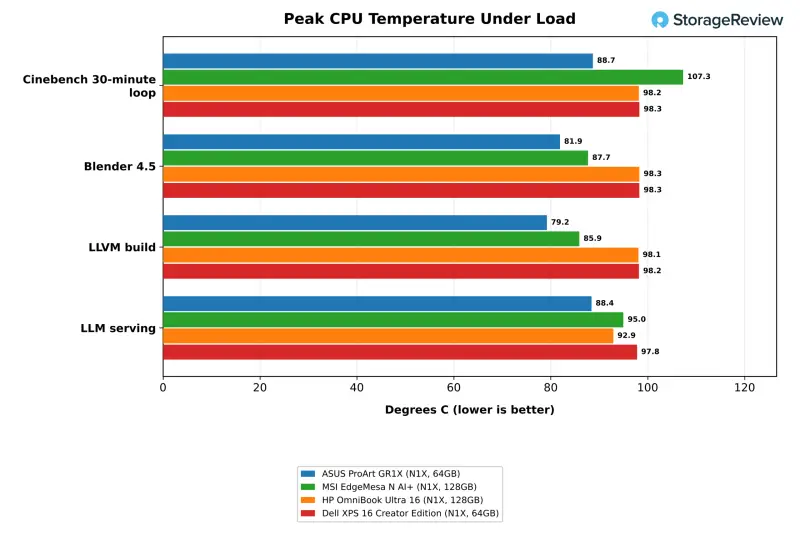
Peak readings stayed below 90C in nine of the ten temperature tests, including 88.7C in the loop, 88.6C in Stockfish and 88.4C in LLM serving. The exception was the standalone Cinebench run, which logged a 103.8C maximum against a 65.3C mean. That short excursion didn't repeat in the 30-minute loop. The EdgeMesa logged peaks above 100C in three tests. GPU-heavy work ran cooler still, with image generation averaging 63.9C and RAG averaging 65.3C on the GR1X. The SSD reached 53C during the storage test.
Content Creation and Build Workloads
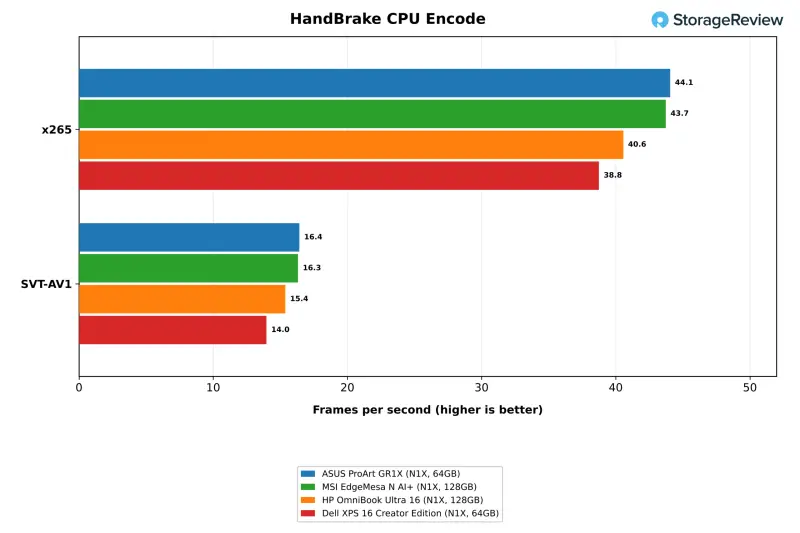
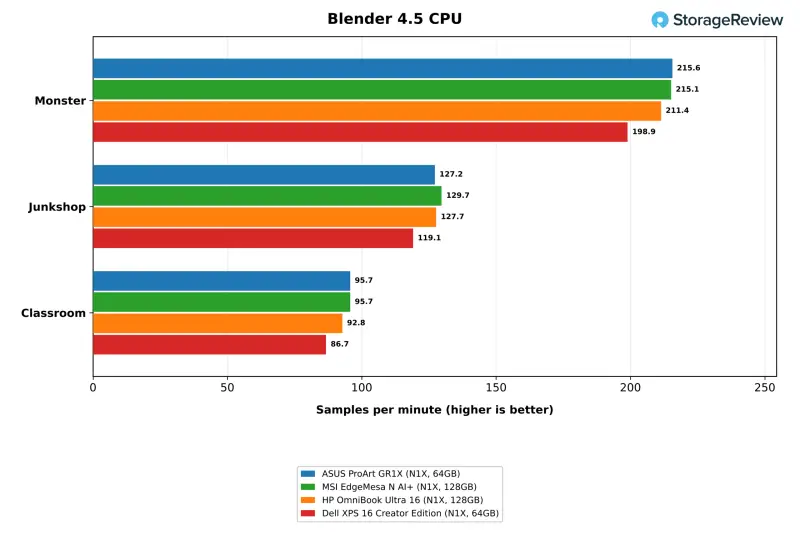
Video encoding gave the GR1X its largest application lead. HandBrake's x265 encode ran at 44.1 fps, against 40.6 on the HP and 38.8 on the XPS 16. That's a 9 and 14 percent lead. SVT-AV1 ran at 16.4 fps, against 15.4 and 14.0. The EdgeMesa was level, at 43.7 fps and 16.3 fps. Blender's Classroom scene rendered at 95.7 samples per minute, 3 and 10 percent ahead of the laptops, and the Monster scene at 215.6 was 2 and 8 percent ahead. The Junkshop scene was a near tie, with the GR1X at 127.2, the HP at 127.7 and the EdgeMesa at 129.7.
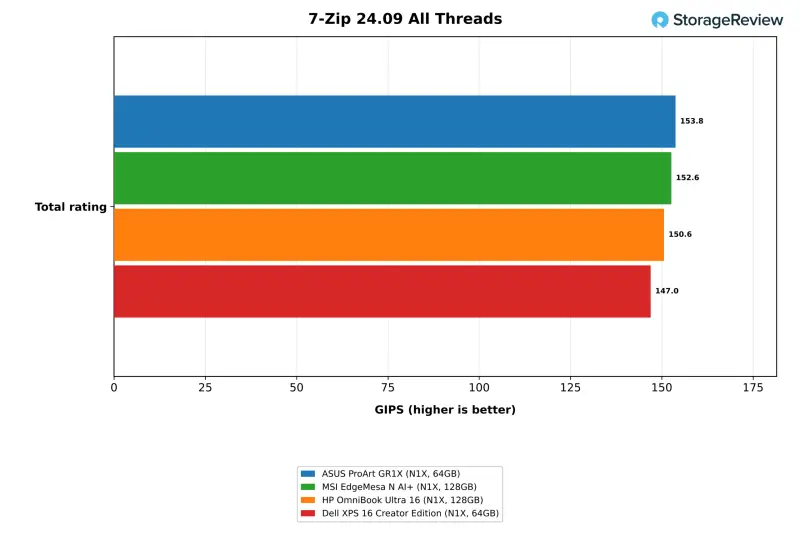
7-Zip with all threads measured 153.8 GIPS on the GR1X, 152.6 on the EdgeMesa, and 150.6 and 147.0 on the laptops. That's a smaller spread, which fits a test limited as much by memory as by clock speed. The LLVM build was the one all-core test where the ASUS didn't lead. It finished in 225 seconds, behind the EdgeMesa at 217 and the HP at 218, and ahead of the XPS 16 at 232. A full compile mixes single-thread phases and file I/O with parallel work. The single-thread 7-Zip result of 8.92 GIPS on both desktops sat just under the laptops at 9.10 and 9.13.
Compute, Web and HPC Kernels
Shorter and lightly threaded tests land close together. Stockfish with all threads ran at 15.13 Mnps on the GR1X, level with the HP at 15.19 and 9 percent ahead of the XPS 16 at 13.87. primesieve to 10^12 finished in 9.39 seconds, against 9.53 on the HP and 10.39 on the XPS 16. The EdgeMesa ran Stockfish at 14.42 Mnps and primesieve in 9.40 seconds. The single-thread Python tests and Speedometer 3.1 landed within about 3 percent of the HP on both desktops, while the XPS 16 led the browser test at 36.5 against 34.3. For everyday desktop responsiveness, the four machines are effectively equal.
Memory-bound work is a wash, which makes sense with identical LPDDR5X-9400 in all four machines. STREAM Triad measured 124,529MB/s on the GR1X, 122,423 on the EdgeMesa, and 120,783 and 122,872 on the laptops. Latency on 4KiB pages ranged from 140.5ns to 143.6ns. GROMACS benchMEM produced 17.41 to 17.48 ns/day across the group. OpenBLAS DGEMM at 356.8 GFLOPS trailed the HP at 374.0 by about 5 percent and matched the XPS 16. The LU solve stayed within about 2 percent across all four.
Local AI: LLM Serving
The serving test sends one, four and eight simultaneous requests to each model through llama.cpp. That's roughly the load a few people sharing one system would generate. A single request produced 58.4 tokens per second on Ministral 3 3B, 42.7 on the 8B model and 13.1 on Qwen3.8 27B. All three were within 6 percent of both laptops and within 1 percent of the EdgeMesa. The first token from the 27B model arrived in 8.6 seconds on the GR1X and 8.7 on the EdgeMesa. It took 10.8 and 10.9 seconds on the HP and the XPS 16.
| LLM serving, llama.cpp CUDA, Q4_K_M (tokens/s unless noted) | ASUS GR1X (64GB) | MSI EdgeMesa (128GB) | HP OmniBook Ultra 16 (128GB) | Dell XPS 16 CE (64GB) |
|---|---|---|---|---|
| Ministral 3 3B, 4 requests | 154.9 | 152.0 | 148.8 | 146.4 |
| Ministral 3 8B, 4 requests | 109.3 | 107.5 | 104.1 | 96.3 |
| Qwen3.8 27B, 1 request | 13.1 | 13.0 | 12.6 | 12.4 |
| Qwen3.8 27B, 4 requests | 31.4 | 31.1 | 28.1 | 27.5 |
| Qwen3.8 27B, 8 requests | 40.0 | 39.8 | 33.8 | 31.9 |
| Qwen3.8 27B, 1 request, time to first token (ms) | 8,604 | 8,721 | 10,818 | 10,935 |
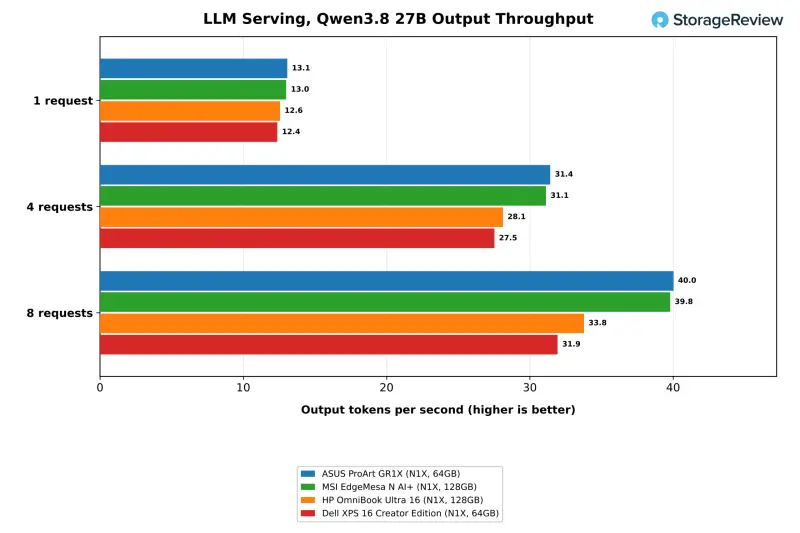
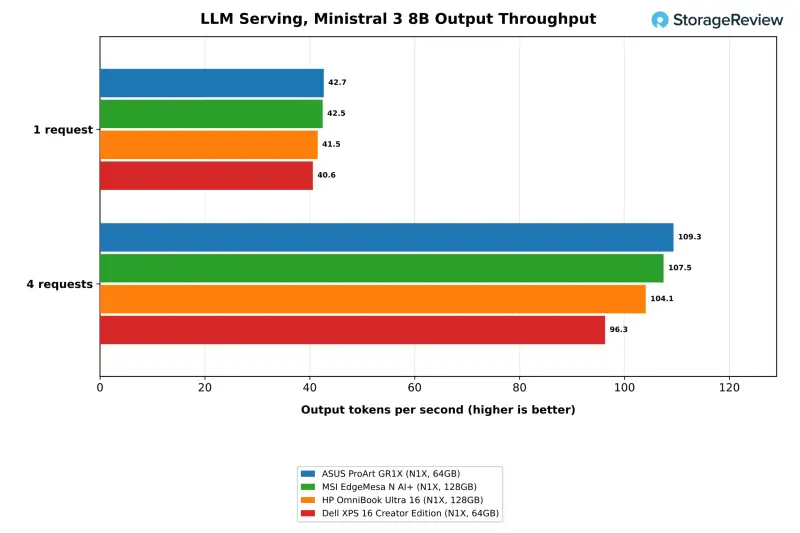
The systems separate once requests stack up on the larger model. At four requests on Qwen3.8 27B, the GR1X produced 31.4 tokens per second, against 28.1 and 27.5. At eight requests it produced 40.0, against 33.8 and 31.9. That's 18 percent ahead of the HP and 25 percent ahead of the XPS 16. Ministral 3 8B at four requests ran at 109.3 tokens per second, against 104.1 and 96.3. The desktop's higher power limit and cooler keep the chip well under its ceiling, and the gap widens with load.
The EdgeMesa followed the GR1X within 2 percent across the serving table. Its 128GB of memory made no difference here, because every model in the table fits on the 64GB unit. Two desktops with different memory sizes serve models of this class at the same rate.
The 64GB unit ran the 27B model with room for eight requests. The suite did not run the 35B coding-agent model or Qwen-Image at Q8 on it. ASUS ties 120B-class models to the 128GB configuration, and this review didn't test that size on any RTX Spark system. The Windows client suite doesn't include it, and the lab runs models of that size in its Linux suite on larger unified-memory desktops and GPU workstations. If you plan to go well past the 27B class, the 128GB GR1X is the configuration to order.
MLPerf Client and Single-Prompt Speed
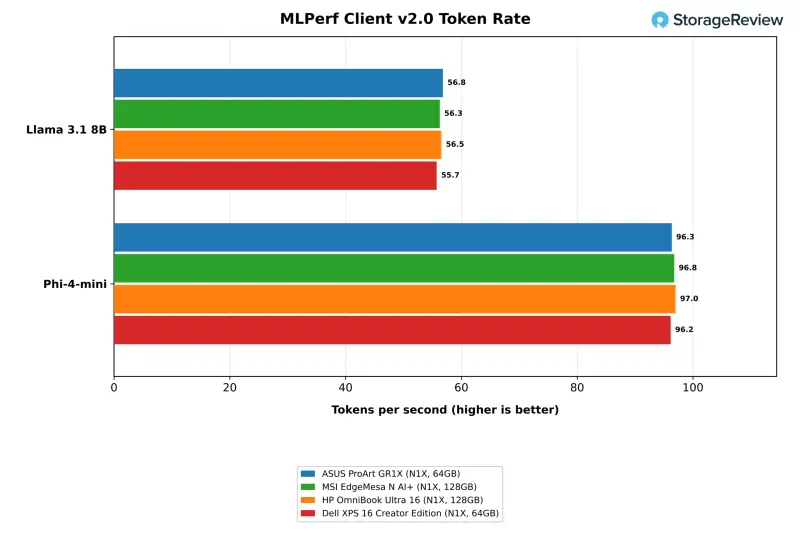
MLPerf Client issues one prompt at a time, and the results are close to a four-way tie. The GR1X generated 56.8 tokens per second on Llama 3.1 8B and 96.3 on Phi-4-mini. The EdgeMesa managed 56.3 and 96.8, the HP 56.5 and 97.0, and the XPS 16 55.7 and 96.2. Time to first token on Llama 3.1 8B was shortest on the ASUS at 0.24 seconds, and the GR1X tied the EdgeMesa at 0.11 seconds on Phi-4-mini. Someone working with a small model won't notice a speed difference between this desktop, the EdgeMesa and either laptop.
Model Loading and the Coding Agent
Cold model loads are the one AI result where the GR1X finished last, and the cause is the drive. It took 10.94 seconds to load the 12.8GB gpt-oss:20b model from disk to first token. The HP took 6.70 seconds, the EdgeMesa 7.00 and the XPS 16 7.73. Read throughput during that load averaged 1,788MB/s on the ASUS. The Gen5 drives in the EdgeMesa and HP averaged 3,446MB/s and 3,211MB/s, and the XPS 16 averaged 2,372MB/s. Warm loads took 3.68 to 3.69 seconds on the GR1X and the laptops, and 3.96 seconds on the EdgeMesa. The gap sits in storage, not in the chip.
The coding-agent test asks a model to write and test code across several rounds, three times per configuration. With gpt-oss:20b at a 64K context, the GR1X passed one of three attempts, the EdgeMesa and HP passed two, and the XPS 16 passed all three. Generation rates were level, from 57.1 to 58.5 tokens per second, so the pass counts reflect run-to-run variation in the model's output. The 128GB EdgeMesa also ran the 35B agent tier, which the suite doesn't run on the 64GB systems. When Speedometer ran alongside the agent, the browser slowed by 1.79x on the ASUS and 1.78x on the MSI, compared with 2.35x and 2.79x on the laptops.
Flagged by the suite: at least one of the three agent runs did not pass all tests.
RAG and Image Generation
The RAG test embeds a set of passages, retrieves against them and answers questions with phi4-mini. The GR1X ingested 115.6 passages per second, 4 percent ahead of the HP at 111.5 and 11 percent ahead of the XPS 16 at 104.4. It generated answers at 104.2 tokens per second, against 103.4 and 95.0, and the median question was answered in 0.22 seconds. The EdgeMesa was level at 114.7 passages per second. A document assistant at this scale fits comfortably in the 64GB configuration.
Image generation runs through Vulkan, and the results are mixed. FLUX.2 klein 4B at Q4 produced 10.07 images per minute on the GR1X, against 11.01 on the HP and 11.17 on the XPS 16. Z-Image Turbo 6B at BF16 matched the HP at 4.17 against 4.19, and Qwen-Image 20B at Q4 edged both laptops at 0.53 images per minute. The laptops ran an earlier suite release, while the EdgeMesa ran the current one and produced 9.95 on FLUX.2, level with the GR1X. That points to the suite release, not the hardware, as the source of the gap.
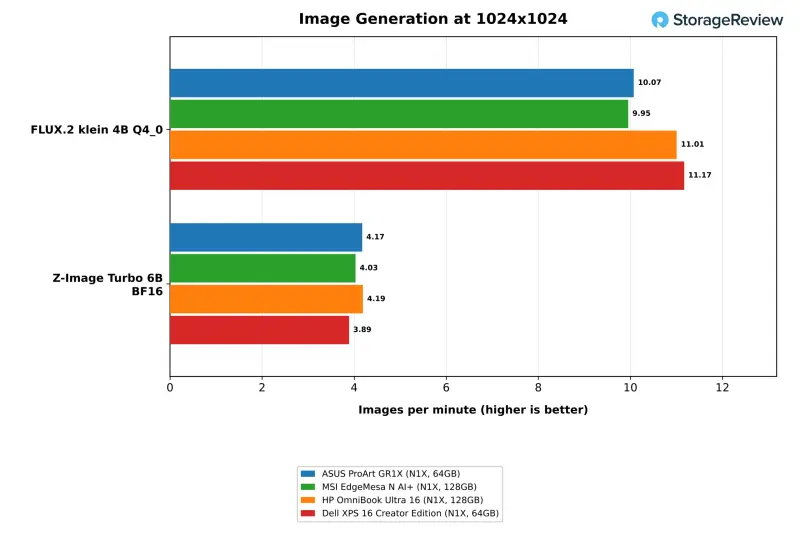
The larger Q8 and BF16 builds of Qwen-Image 20B didn't run on the 64GB unit. The 128GB EdgeMesa and HP completed the Q8 version at 0.51 and 0.47 images per minute. FLUX.2 klein at Q8 was flagged for a stalled image, and the BF16 version failed on both attempts when the Vulkan device was lost. Those rows are left out of the table. This is the clearest case where memory size decides what you can run at all.
Graphics, GPU Encoding and Storage
SuperTuxKart at the ultra preset averaged 274.0 fps at 1080p on the GR1X, ahead of the HP at 269.7 and the XPS 16 at 248.6. The GR1X also averaged 114.1 fps at 4K on the external monitor, a resolution the laptops didn't run. The EdgeMesa managed 269.8 fps at 1080p and 111.8 fps at 4K. FFmpeg's hardware HEVC encode through Media Foundation reached 65 fps on the GR1X, against 54 on the EdgeMesa, 53 on the HP and 61 on the XPS 16. The hevc_nvenc encoder isn't present in the Arm build of FFmpeg that the suite uses, so that path was not measured.
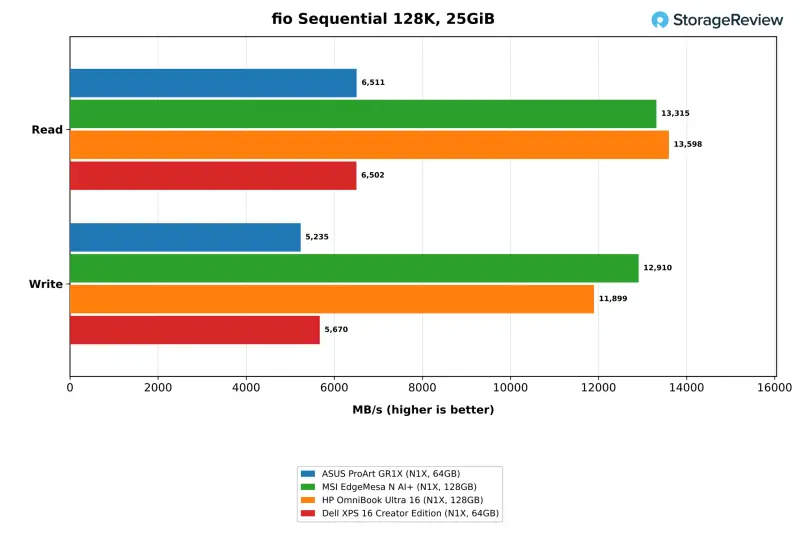
Sequential storage tells the drive story. The 1TB Micron drive delivered 6,511MB/s read and 5,235MB/s write on the 25GiB footprint. That's level with the XPS 16's 1TB drive at 6,502 and 5,670MB/s. It's about half the rate of the Gen5 drives in the EdgeMesa (13,315 and 12,910MB/s) and the HP (13,598 and 11,899MB/s). ASUS's 4TB Gen5 option is the factory route to those numbers, and the cold-load results show what the faster interface is worth for model files.
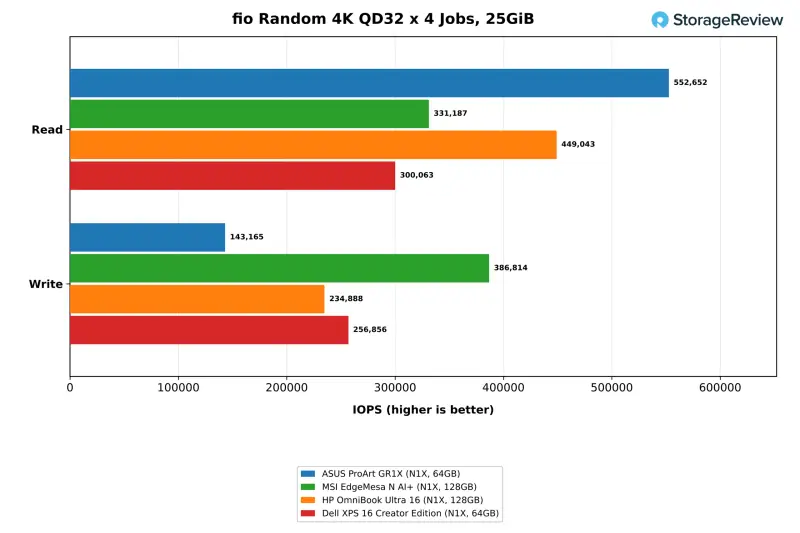
Random reads were the drive's strongest result. At queue depth 32 across four jobs, it delivered 552,652 IOPS, ahead of the HP at 449,043 and the XPS 16 at 300,063. The suite's peak pass across job counts reached 976,418 IOPS. Random writes were the weak spot at 143,165 IOPS, against 386,814 on the EdgeMesa and 234,888 and 256,856 on the laptops. With two 2280 slots, a 64GB buyer can keep this drive for Windows and add a second one for models. That's the first upgrade I'd make.
Bottom Line for Buyers
The GR1X makes its case through cooling. It ran the 30-minute loop 5 to 12 percent faster than the fastest N1X laptops while averaging about 14C lower, and it stayed under 90C in nine of ten temperature tests. That margin showed up as 9 to 14 percent more x265 throughput and 18 to 25 percent more output with eight requests on a 27B model. ASUS's claim that owners will rarely see thermal throttling held up in these runs, though a single lab cooling test doesn't cover every room or every ambient temperature.
Storage is the second reason to pick this chassis. Two M.2 2280 slots mean the 1TB Gen4 drive is a starting point, not a ceiling. That drive was the slowest part of the system in cold model loads and random writes, and it can be supplemented with standard retail drives. The cold load of the 12.8GB model took 10.94 seconds against 7.00 seconds on the EdgeMesa's Gen5 drive, so a Gen5 option or a second drive is worth weighing if model-load time matters to your workflow.
Memory is the decision to get right at purchase. The 64GB configuration handled models up to the 27B class with eight concurrent requests, RAG and the smaller image models. It stopped short of Qwen-Image at Q8 and the 35B coding-agent model. For work inside that envelope, the 64GB GR1X matched or led the 128GB systems in LLM serving and most CPU tests. Its widest deficits were about 4 percent in the LLVM build and 5 percent in OpenBLAS DGEMM. Larger models call for the 128GB unit.
Against the MSI EdgeMesa N AI+, performance is a near tie. The two landed within 2 percent of each other in the Cinebench loop, Blender, x265 encoding and LLM serving. The GR1X ran 3C to 8C cooler on average in CPU tests, and it has two M.2 2280 slots where the EdgeMesa offers the one SSD we saw. The EdgeMesa we tested carried 128GB and a 4TB Gen5 SSD, so it loaded models faster and ran the larger ones the 64GB unit couldn't. NVIDIA said the EdgeMesa configuration carries a $7,499 MSRP, $3,000 above the 64GB GR1X.

Within ASUS's own range, the GR1X is the desktop Windows option beside the ProArt P16 and P14 laptops. The Ascent GX10 is the pick for Linux and DGX OS development. Against the laptops tested here, the GR1X trades away the built-in display, keyboard and battery for lower temperatures, higher sustained output and a second SSD slot. At $4,499 with 64GB and a 1TB SSD, it lands about $300 below the 64GB XPS 16 Creator Edition, which was $4,799.99 with the same memory and SSD size when it was reviewed. Once you add a monitor, keyboard and mouse, that saving shrinks quickly. For a team that wants a fixed, cool-running local AI box on the desk, the GR1X is the strongest case in this group. Check the 1TB drive, the 64GB memory ceiling and the lack of Type-A ports before you order.


